What is Printer | Parts – Working | Types & History
Published: 15 Sep 2026
Have you ever wondered how a document on a computer suddenly appears on paper? Many students use printed assignments and pictures every day, but do not know how this process actually works.
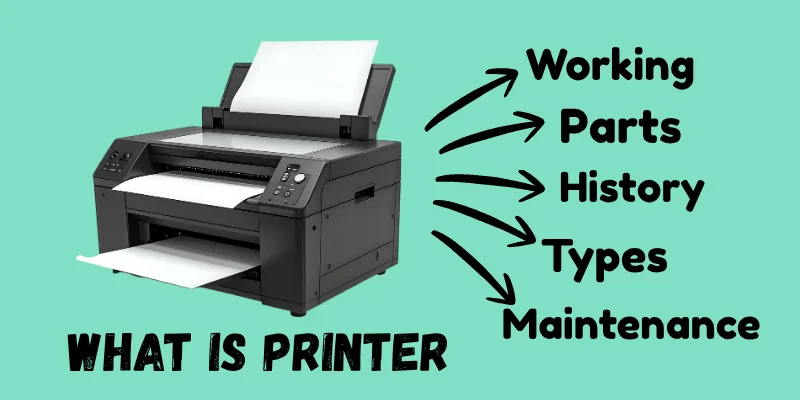
In this article, you will learn what a printer is, its parts, how it works, different types of printers, and why printers are important.
Definition
A printer is an output device that prints text, images, and documents from a computer onto paper. It converts digital information into a physical copy called a hard copy.
Working
A printer works by receiving a print command from a computer or mobile device. The printer processes the information and places ink or toner onto paper to create text or images. Finally, the printed paper comes out as a hard copy of the digital document.
Parts of a Printer
A printer is made up of several important parts that work together to print documents and images on paper. Each part has a specific function that helps the printer operate smoothly.
1. Paper Tray – Holds the paper that will be used for printing.
2. Ink Cartridge / Toner Cartridge – Contains ink or toner powder used to create text and images.
3. Print Head – Sprays or places ink onto the paper during printing.
4. Rollers – Move the paper inside the printer while printing.
5. Control Panel / Buttons – Used to turn the printer on, start printing, or cancel tasks.
6. USB Port / Wireless Connection – Connects the printer to a computer, laptop, or mobile device.
History
The history of printers began with the Epson EP-101, introduced in 1968 by Epson, which became the world’s first compact digital printer and marked the start of modern computer printing.
Later, in 1984, the IP-130K (also known as the SQ-2000) was developed, improving printing speed and quality for computer systems. These inventions helped printers evolve from large machines into the fast and user-friendly devices we use today.
Main Types of Printers
- Inkjet Printers – These printers spray tiny drops of liquid ink onto paper and are commonly used for home and photo printing.
- Laser Printers – These use toner powder and a laser beam to print fast and high-quality documents, mostly used in offices.
- 3D Printers – These printers create real 3D objects by building them layer by layer using special materials.
- LED Printers – Similar to laser printers, but they use LED light instead of a laser to produce images on paper.
- Solid Ink Printers – These use solid ink sticks that are melted before printing, producing bright and vibrant colors.
- Dot Matrix Printers – These print using a moving print head that strikes an ink ribbon to form characters; mostly used for receipts and bills.
- Multifunction or All-in-One Printers – These combine printing, scanning, copying, and sometimes faxing in one device.
- Thermal Printers – These use heat to print on special thermal paper, commonly used in shops, ATMs, and billing systems.
- Plotters – These are large printers used to print big drawings like maps, architectural designs, and engineering plans.
| Advantages of Printers |
|---|
|
| Disadvantages of Printer |
|---|
|
Printer Maintenance Tips
Printer maintenance means taking proper care of the printer to keep it working smoothly. It includes keeping the printer clean, using good-quality ink and paper, and turning it off properly after use. Regular printing and cleaning help prevent problems like paper jams and ink blockage.
Printers Commonly Used for Daily Tasks
- Wireless Printer: A printer that connects to devices through Wi-Fi, allowing users to print wirelessly from computers, smartphones, and tablets.
- CD Duplicator and Printer: A machine that copies CDs/DVDs and prints labels on them, mainly used for software, music, videos, backups, and promotional discs.
- Hot Foil Printer: A printing machine that uses heat and pressure to transfer foil onto surfaces, commonly used for packaging, cards, labels, and logos.
- Ribbon Printer: A thermal transfer printer that uses an ink ribbon to print text, barcodes, and images on labels, tags, and packaging.
- Double-Sided ID Card Printer: An ID card printer that prints on both sides of a card, commonly used for employee, student, membership, and access cards.
- Wristband Printer: A specialized thermal printer, used to print names, barcodes, and other information on wristbands for hospitals, events, and visitor identification.
- Kiosk Receipt Printer: A compact thermal printer built into self-service kiosks to print receipts, tickets, and transaction slips.
- Hang Tag Printer: A printer designed to print product information, prices, barcodes, and other details on hanging tags for retail products.
- Safety Sign Printer: A specialized printer used to create warning labels and safety signs for workplaces, factories, warehouses, and public areas.
Final Words
In this article, we learned what a printer is, how it works, its main parts, different types of printers, advantages, disadvantages, maintenance tips, and the history of printers. Now you understand how computers convert digital information into printed paper.
If you still have any confusion or questions, feel free to ask in the comments – I will be happy to help you learn more.


- Be Respectful
- Stay Relevant
- Stay Positive
- True Feedback
- Encourage Discussion
- Avoid Spamming
- No Fake News
- Don't Copy-Paste
- No Personal Attacks
- Be Respectful
- Stay Relevant
- Stay Positive
- True Feedback
- Encourage Discussion
- Avoid Spamming
- No Fake News
- Don't Copy-Paste
- No Personal Attacks
