What is a Safety Sign Printer?
Published: 15 Sep 2026
Standard home and office printers are designed for regular paper documents, but industrial workspaces, construction sites, and factory floors need specialized marking tools to keep work areas safe and compliant.
This essential tool is the safety sign printer, also widely known as a safety sign label printer.
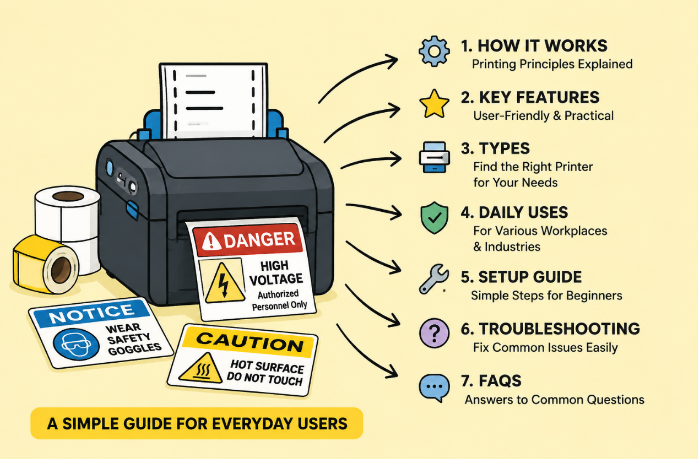
Unlike regular printers that produce fragile, easy-to-fade paper prints, a safety sign label printer creates durable, weather-resistant warning signs, hazard labels, and safety markers.
These printed signs follow standard workplace safety rules, making them ideal for marking dangerous zones, equipment hazards, and operational guidelines. For most business and facility managers, an in-house safety sign printer eliminates the hassle of slow third-party printing services, ensuring quick access to clear, reliable safety labels anytime.
This article covers its simple working principle, key user-focused features, common types, daily uses, basic setup, easy fixes for common issues, and helpful FAQs.
1. How Does a Safety Sign Printer Work?
Safety sign printers rely on two simple, reliable printing technologies tailored for daily safety marking needs, with thermal transfer being the go-to option for most users.
1.1 Thermal Transfer Printing (Daily Use Standard)
Most consumer and industrial safety sign label printer models use thermal transfer technology. With the help of carbon ribbons, the printer transfers clear, solid ink onto durable materials like PVC, reflective film, and waterproof label rolls.
Users benefit most from this technology because the final prints are scratch-proof, fade-resistant, and suitable for both indoor and outdoor use.
Most models also come with automatic feeding and cutting functions, letting users get finished, ready-to-use safety signs with one simple print command.
1.2 UV Inkjet Printing (For Large Outdoor Signs)
UV inkjet printing is reserved for large-format outdoor safety sign printers. It uses fast-drying UV ink that sticks firmly to rigid materials. This technology creates extra-durable large safety boards for construction sites and road warnings, though it is less common for daily small-scale safety label printing for regular facilities.
2. User-Friendly Features of a Safety Sign Label Printer
Designed for ordinary users rather than professional technicians, safety sign printers pack practical, easy-to-use features that solve real workplace problems:
- Pre-Made Safety Templates: Built-in standard safety sign templates cover common warning, caution, and danger markers. No design skills are needed-users can edit and print compliant signs in minutes.
- Multi-Material Support: It works with waterproof, sun-proof, and corrosion-resistant label materials, so printed signs stay intact in dusty, humid, or outdoor working environments.
- Automatic Printing & Cutting: Intelligent paper feeding and auto-cutting functions avoid manual trimming, greatly saving time for bulk sign printing.
- Simple Connectivity: Most models support USB and Bluetooth connection, allowing users to print from computers or mobile devices flexibly.
- Long-Lasting Print Quality: Prints resist fading, scratching, and weather erosion, reducing frequent sign replacement work for facility managers.
3. Common Types of Safety Sign Printers
Users can choose the right safety sign printer based on their daily printing volume and usage scenarios:
3.1 Compact Desktop Models
Lightweight and space-saving, these small printers are perfect for small workshops, laboratories, and offices. They print small hazard tags, equipment warning labels, and electrical panel markers for low-volume daily use.
3.2 Medium Wide-Format Models
This is the most popular option for most factories and construction teams. It supports standard-size safety signs and high-volume printing, meeting daily needs for workplace safety marking and replacement.
3.3 Large-Format UV Models
Built for professional large-scale signage production, these printers make oversized outdoor safety boards for roads and large construction sites, rarely used for regular facility daily operations.
4. Daily Uses of Safety Sign Printers
A safety sign label printer simplifies workplace safety management across various industries with practical daily applications:
- Manufacturing: Print equipment danger labels and pipeline safety markers
- Construction Sites: Make fall hazard warnings and no-entry safety signs
- Warehousing: Produce forklift traffic warnings and cargo hazard labels
- Labs & Utilities: Create chemical and high-voltage safety reminder labels
5. Simple Setup Steps for Beginners
Safety sign printers are designed for user-friendly operation, with a simple setup process for new users:
- Install the matching carbon ribbon and load the selected safety label material
- Connect the printer to a computer or mobile device via USB or Bluetooth
- Open the supporting editing software and pick a ready-made safety template
- Customize text and size according to your workplace needs
- Print and auto-cut the sign, then check the quality before batch printing
6. Easy Troubleshooting for Common Issues
Most daily printer problems can be fixed quickly without professional help:
- Faded prints: Replace old carbon ribbons or clean the printer head
- Cutting jams: Clean debris in the cutter and adjust the label roll
- Connection issues: Reconnect the device or update basic firmware
- Paper feeding errors: Use standard-size label materials and recalibrate
Frequently Asked Questions (FAQ)
Yes. Regular label printers only make thin, short-lived paper stickers. A dedicated safety sign label printer produces durable, compliant safety markers for harsh workplace environments, with professional templates and auto-cutting features that regular printers lack.
Absolutely. When paired with waterproof and reflective label materials, the printed signs resist sunlight and rain, working well for long-term outdoor use.
No. All standard models come with free, easy editing software and pre-built safety templates, allowing anyone to create standard signs quickly.
Simply clean the printer head and cutter regularly, and replace ribbons and worn parts occasionally to keep stable print quality. That’s also why choosing a reliable thermal transfer printing manufacturer is also important. A good manufacturer would have provide professional and systematical guidance for using and maintain the machine.
Conclusion
A safety sign printer or safety sign label printer is a practical, user-centric tool for modern workplace safety management. It simplifies the process of making standard, long-lasting safety signs on-site, avoiding the delays and quality issues of outsourced printing.
With easy setup, intuitive operation, and reliable performance, it helps facility managers standardize workplace safety markings, reduce compliance risks, and maintain a safe working environment effortlessly.


- Be Respectful
- Stay Relevant
- Stay Positive
- True Feedback
- Encourage Discussion
- Avoid Spamming
- No Fake News
- Don't Copy-Paste
- No Personal Attacks
- Be Respectful
- Stay Relevant
- Stay Positive
- True Feedback
- Encourage Discussion
- Avoid Spamming
- No Fake News
- Don't Copy-Paste
- No Personal Attacks
