What is a Hang Tag Printer | Uses – Features | Types & Troubleshooting
Published: 15 Sep 2026
If you own apparel, jewelry, boutique or handmade product brands, you have likely struggled with inconsistent outsourced swing tags, long vendor lead times and minimum order charges.
This pain point is fully solved by a dedicated printing device known as a hang tag printer, also commonly called a hang tag printer machine.
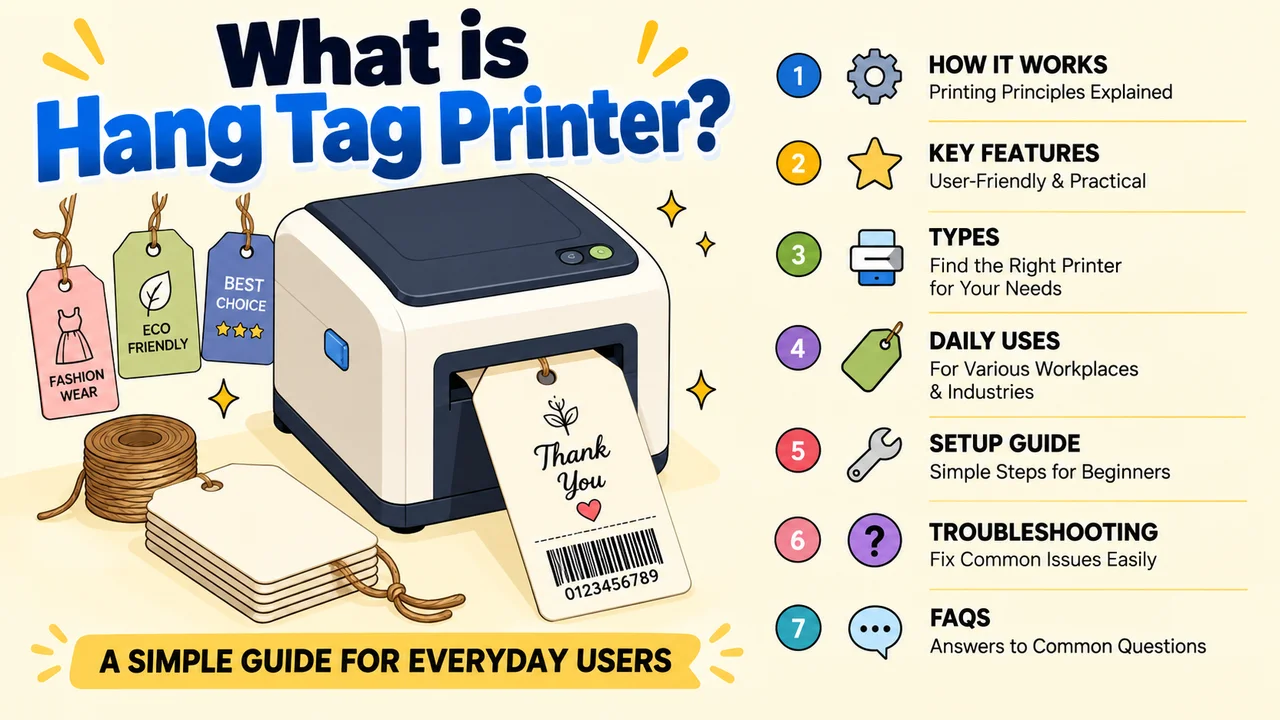
Standard home or office printers cannot handle thick rigid cardstock, which makes them unsuitable for retail product tags.
Unlike regular label printers designed for thin adhesive stickers, this specialized machine is built exclusively for printing thick swing tags with logos, pricing, size charts, care instructions, barcodes and QR codes. From small boutique owners to medium garment workshops, users gain huge convenience by printing custom tags in-house on demand.
This guide explains its working logic from a user’s perspective, highlights practical daily-use features, breaks down common types, lists real industry applications, shares simple beginner setup steps, solves frequent minor faults, and answers common user questions in a dedicated FAQ section.
1. How Does a Hang Tag Printer Machine Work?
Two core printing technologies power all consumer and commercial hang tag printer machines, each delivering a different user experience for brand owners.
Thermal Transfer Printing (Most Popular for Long-Lasting Tags)
For most business users, thermal transfer is the preferred printing method. The machine uses ink ribbons that melt under heat onto thick tag cardstock via a high-definition print head. From a user standpoint, the biggest advantage is scratch, smudge and fade resistance – tags stay crisp on store shelves for months without smudging care symbols or barcodes.
Most desktop versions come with an automatic tag feeding tray that holds stacks of blank cards. Users do not need to feed one tag manually during bulk printing, which saves hours of repetitive work during seasonal restocks. It supports thick tag stock ranging from thin jewelry labels up to heavy apparel cardstock, eliminating constant media adjustment headaches.
Direct Thermal Printing (For Temporary Short-Term Tags)
Entry-level budget hang tag printers skip ink ribbons and rely on heat-sensitive paper only. While cheaper to run for temporary price labels, users often complain about rapid fading under sunlight or warm shop lighting. This technology is only recommended for pop-up events or short-term promotions, not permanent brand swing tags.
2. User-Friendly Features of a Hang Tag Printer
Every functional hang tag printer machine is designed to remove technical barriers for non-technical store staff, with these practical daily benefits:
- High 300DPI print resolution: Renders tiny care icons and small barcodes clearly, so users avoid unreadable tags that confuse customers.
- Adjustable media width: Accommodates narrow jewelry tags and wide apparel swing tags without buying separate devices.
- Automatic feeding hopper: Holds up to 100 blank tags for uninterrupted batch printing, cutting manual loading time.
- Simple wired USB connection: Plug-and-play setup for Windows and Mac, no complex wireless network configuration required.
- Free pre-built design software: Packaged with ready-to-use tag templates; users edit text, logos and symbols without graphic design skills.
- Built-in touch control panel: Adjust print darkness and media size directly on the machine, no need to open computer software repeatedly.
- Wide material compatibility: Works with coated paper, synthetic stock and lightweight rigid tags for multi-industry use.
3. Common Types of Hang Tag Printer Machines
Users can select a model based on their daily tag output volume and business scale:
Compact Desktop Hang Tag Printer
Lightweight tabletop units made for small boutiques, handmade jewelry shops and independent fashion designers. Low daily printing volume fits occasional restocks, and the small footprint fits limited retail back-office space.
Mid-Size Batch Hang Tag Printer
The most widely used version for multi-store retailers and medium garment workshops. The large auto feeding tray supports daily mass tag production, balancing speed and ease of operation for full-time retail staff.
Industrial High-Volume Hang Tag Printer
Heavy-duty floor models for large clothing manufacturers with non-stop all-day printing. Built to handle thousands of tags daily for mass wholesale product shipments, rarely needed for small to mid-sized retail brands.
4. Real-World Uses for Hang Tag Printer
From small craft sellers to manufacturing facilities, a hang tag printer machine simplifies product branding across multiple sectors:
- Fashion & Apparel: Garment swing tags with brand logos, sizing and fabric washing instructions
- Footwear & Leather Goods: Shoe and handbag price tags with material descriptions
- Jewelry & Cosmetics: Mini identification tags for small accessories and beauty sets
- Toys & Home Textiles: Compliance tags listing safety standards and material composition
- Wholesale Warehouses: Batch inventory tags for bulk product tracking before shipping
5. Step-by-Step Beginner Setup Guide
The entire installation process is streamlined for users with zero printer experience:
- Open the printer housing and install matching wax or mixed ink ribbon, tightening spools to avoid uneven ink transfer.
- Load blank hang tags into the auto hopper and slide width guides to fit your card size.
- Connect the printer to a desktop or laptop via USB cable and install the free bundled editing software.
- Choose a pre-made tag template inside the tool, edit pricing, brand logos and care graphics to match your products.
- Print one test tag to check alignment and print sharpness before launching large batch printing jobs.
6. Common Troubleshooting for Hang Tag Printer Issues
These quick fixes resolve most daily faults without calling professional repair services, from a regular user’s perspective:
- Faded, pale tag prints: Replace worn thermal ribbon or boost print density in software settings.
- Constant tag jams: Clear dust and leftover card scraps from the feeding tray, re-adjust width guides to fit tag stock.
- Blurry unscanable barcodes: Wipe the print head with alcohol wipes to remove built-up ink residue.
- computer fails to detect the printer: Reconnect the USB cable and restart both the printer and your device to refresh recognition.
Final Words
A hang tag printer, also known as a hang tag printer machine, is an essential piece of specialized printing hardware for any business selling physical branded goods.
It eliminates the delays, minimum fees and inconsistent quality of outsourced tag printing, putting full design control directly into the hands of retail and workshop staff. With user-friendly touch controls, free ready-to-print templates and straightforward setup, even team members with no technical printer knowledge can produce crisp, durable custom swing tags in-house.
Choosing the right size model based on daily printing volume ensures smooth, low-effort product labeling for small boutiques, multi-location retailers and medium manufacturing operations alike.
Frequently Asked Questions (FAQs)
Standard label printers only support thin adhesive roll stickers. A dedicated hang tag printer machine processes thick, rigid single cardstock with auto batch feeding. Regular printers will jam or produce blurry text on thick swing tags, while this specialized hardware is optimized for retail brand labeling.
No. Tags printed with thermal ink ribbons resist sunlight, heat and physical scratching, remaining clear for months of shelf display – a major benefit compared to disposable direct thermal temporary tags.
Absolutely not. All standard hang tag printers include free editing software with pre-built templates. Users simply type in pricing and brand details to generate professional-looking tags in minutes.
Weekly simple upkeep only: Wipe the print head with alcohol cloth to clear ink dust, and remove leftover tag scraps from the feeding tray after printing sessions. Replace ribbons as they run low to maintain consistent print quality. That’s why choosing a reliable thermal transfer printer manufacturer is essential. A good manufacturer provides reliable products along with complete and professional maintenance service.
Yes. Adjustable media width supports slim tag sizes ideal for jewelry, alongside wider cardstock for clothing swing tags, covering all common retail labeling needs in one machine.


- Be Respectful
- Stay Relevant
- Stay Positive
- True Feedback
- Encourage Discussion
- Avoid Spamming
- No Fake News
- Don't Copy-Paste
- No Personal Attacks
- Be Respectful
- Stay Relevant
- Stay Positive
- True Feedback
- Encourage Discussion
- Avoid Spamming
- No Fake News
- Don't Copy-Paste
- No Personal Attacks
