What is a Ribbon Printer?
Published: 15 Sep 2026
If you own a flower shop, gift boutique, retail brand or event planning business, you have likely needed custom printed satin, fabric or gift ribbons.
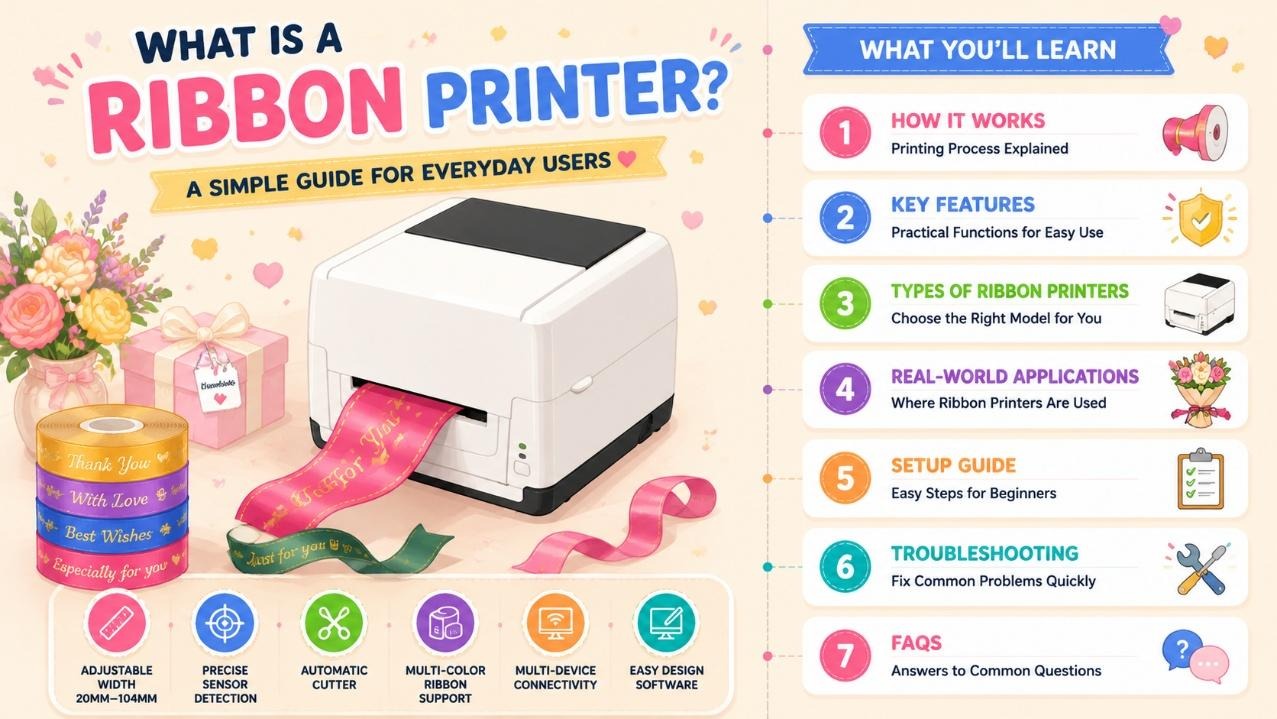
The dedicated hardware built for this task is known as a ribbon printer, also widely called a ribbon printer machine. Regular desktop inkjet and label printers cannot handle soft fabric ribbon rolls; they jam easily, produce smudged ink and fail to deliver long-lasting, water-resistant text on textile materials.
Many small business owners previously ordered pre-printed ribbons from third-party suppliers, which brought high minimum order quantities, long lead times and limited customizable designs.
A desktop ribbon printer lets users print personalized text, logos and slogans on-demand, cutting outsourcing costs and supporting small-batch custom ribbon production for gifts, packaging and celebrations.
This guide covers its core printing process, user-centric practical features, common machine variants, real industry applications, simple beginner setup and quick daily fault fixes, plus a full FAQ section.
How Does a Ribbon Printer Machine Work?
All mainstream desktop ribbon printers adopt thermal transfer hot stamping technology as their core printing method, designed specifically for soft textile substrates like satin and fabric ribbon.
1.1 Thermal Transfer Hot Stamping Core Mechanism
The machine uses colored thermal ribbon as ink carriers. Its high-precision print head heats up and melts pigment onto ribbon surfaces, creating scratch-proof, fade-resistant text that resists water and light exposure.
Standard desktop units support adjustable printing widths ranging from 20mm up to 104mm, compatible with raw ribbon rolls between 25.4mm and 118mm wide.Built-in multi-type sensors (gap, black mark, cover open and ribbon detection) automatically position ribbon stock accurately, eliminating manual alignment work for users.
Most mid-range ribbon printer machines also integrate an automatic cutter, which trims finished ribbons into custom lengths after printing without scissors.Printing speed can be adjusted to match different fabric thicknesses, supporting continuous batch printing for holiday and event orders.
1.2 Entry Manual Feeding Variant
Budget compact ribbon printers remove auto-cut and full sensor suites, requiring users to manually pull and cut each ribbon after printing. These low-cost models suit hobbyists with ultra-low monthly printing volume but slow down mass custom ribbon production.
Features of a Ribbon Printer
Every practical ribbon printer machine is engineered to reduce operation difficulty for shop staff and amateur creators:
- Adjustable print width range (20mm–104mm): Fits slim gift satin strips and wide decorative banner ribbons.
- Multi-sensor positioning system: Automatically detects ribbon edges to avoid misprinted, wasted material.
- Integrated automatic cutter: Produces neat uniform ribbon lengths for packaging and bouquets.
- Multi-connectivity support: Standard USB, plus optional Bluetooth and Wi-Fi for wireless mobile editing.
- Wide media compatibility: Works with satin, fabric, coated paper and lightweight label rolls of 0.06–0.254mm thickness.
- Free dedicated editing software: Preloaded font sets and templates for wedding, holiday and brand slogan ribbons.
- Compact desktop size: Lightweight body fits boutique counters and small home craft workspaces.
- Multiple color thermal ribbon support: Swappable gold, silver, red, black and colored ink ribbons for vibrant custom designs.
Main Types of Ribbon Printer Machines
Buyers can select suitable models based on daily printing volume and business needs:
3.1 Hobby Compact Ribbon Printer
Entry-level manual feed units without auto cutters, ideal for individual crafters, small handmade shops with less than 20 ribbons printed per day. Low upfront cost with simple operation.
3.2 Standard Automatic Ribbon Printer
The most popular all-around ribbon printer machine, equipped with full sensor detection and built-in auto cutter. Perfect for florists, gift stores and event planners handling daily medium-volume custom ribbon orders.
3.3 High-Speed Continuous Ribbon Printer
Heavy-duty desktop machines with faster print speeds and large ribbon roll holders, built for packaging factories and wholesale custom ribbon suppliers producing hundreds of strips daily.
Real-World Industry Uses for Ribbon Printer
A ribbon printer streamlines personalized branding and decoration workflows across multiple sectors:
- Floral Shops: Custom bouquet ribbons with holiday greetings, customer names and shop logos
- Gift & Boutique Stores: Wrapping satin ribbons for birthday, wedding and anniversary presents
- Brand Retailers: Packaging ribbons printed with brand slogans for cosmetic, apparel and candle products
- Event & Wedding Planners: Ceremony decorative ribbons, favor tag strips and party streamers
- Craft & Handmade Businesses: Small personalized fabric labels for homemade jewelry and accessories
- Corporate Marketing: Promotional branded ribbons for trade show gift packages
Step-by-Step Beginner Setup Guide
Operating a ribbon printer requires zero professional technical skills:
- Open the machine’s front compartment and load matching colored thermal ribbon onto the internal spools.
- Adjust the width limit guide to fit your satin or fabric ribbon roll, fix the roll holder tightly.
- Thread ribbon stock through the print head path and close the cover to trigger automatic sensor calibration.
- Connect the device to a computer or mobile device via USB, Bluetooth or Wi-Fi.
- Launch the free editing software, pick a pre-made template and input custom text, logos or slogans.
- Print one test ribbon to check alignment and color effect before starting batch production.
Quick Troubleshooting for Common Ribbon Printer Issues
These simple fixes resolve most daily malfunctions without professional maintenance calls:
- Faint or incomplete printed text: Replace exhausted thermal ribbon or clean the print head with alcohol wipes.
- Ribbon jams during feeding: Adjust the width limiter and clear fabric scraps stuck inside the print path.
- Automatic cutter fails to trim strips: Remove tangled ribbon fragments from the cutting track.
- Wireless connection disconnections: Re-pair Bluetooth/Wi-Fi devices and restart printer power supply.
- Sensor misalignment errors: Re-thread ribbon and run one-click auto calibration in editing software.
Frequently Asked Questions (FAQ)
Q1: What separates a ribbon printer from a regular label printer?
A: Standard label printers are only built for thin adhesive paper rolls. A ribbon printer machine has flexible fabric feeding paths, wide adjustable width guides and textile-compatible thermal transfer systems, designed exclusively for soft satin and fabric ribbon materials that jam regular printers instantly.
Q2: Can I print multi-colored designs with one ribbon printer?
A: Yes. The machine supports swappable colored thermal ribbons including gold, silver, red and black. For multi-color graphics, you can switch ribbon rolls between separate print batches.
Q3: Do I need graphic design experience to make custom gift ribbons?
A: No. All ribbon printers come with free bundled editing software filled with ready-to-use templates for weddings, festivals and retail branding. Users only type text and adjust sizes to finish custom designs quickly.
Q4: What routine maintenance does a ribbon printer need?
A: Weekly simple care: Wipe dust and pigment residue off the print head, clear leftover fabric scraps from the feed and cutter area, and replenish thermal ribbon stock before running large orders. Choose a reliable ribbon printer manufacturer for better product quality and complete maintenance guidance.
Q5: Are printed satin ribbons waterproof and long-lasting?
A: Prints made with thermal transfer pigment ribbons resist water, sweat and sunlight fading, keeping text clear on gift packaging and bouquets for months.
Conclusion
A ribbon printer, also referred to as a ribbon printer machine, is an essential compact printing tool for florists, gift shops, event planners and handmade craft creators.
Unlike generic label or inkjet printers that cannot process soft textile ribbon, its specialized thermal transfer design delivers durable, fully customizable satin and fabric ribbon prints in-house, removing the delays and minimum order fees of outsourced ribbon printing.
Lightweight compact entry models suit hobbyists, while automatic sensor-equipped units meet daily medium-volume business demands. With plug-and-play connectivity, pre-built editable templates and minimal weekly maintenance, even staff with no printer operating experience can produce professional personalized decorative and branding ribbons effortlessly.

- Be Respectful
- Stay Relevant
- Stay Positive
- True Feedback
- Encourage Discussion
- Avoid Spamming
- No Fake News
- Don't Copy-Paste
- No Personal Attacks
- Be Respectful
- Stay Relevant
- Stay Positive
- True Feedback
- Encourage Discussion
- Avoid Spamming
- No Fake News
- Don't Copy-Paste
- No Personal Attacks
