What is a Wristband Printer | Types – Uses | Features & Issues
Published: 15 Sep 2026
If you’ve visited hospitals, music festivals, water parks or private parties, you’ve seen custom identification bands printed on-site by a wristband printer.
This specialized compact printer is split into two mainstream use variants: medical ID band devices and an event wristband printer, which also works as a flexible color wristband printer for branded, vibrant band designs.
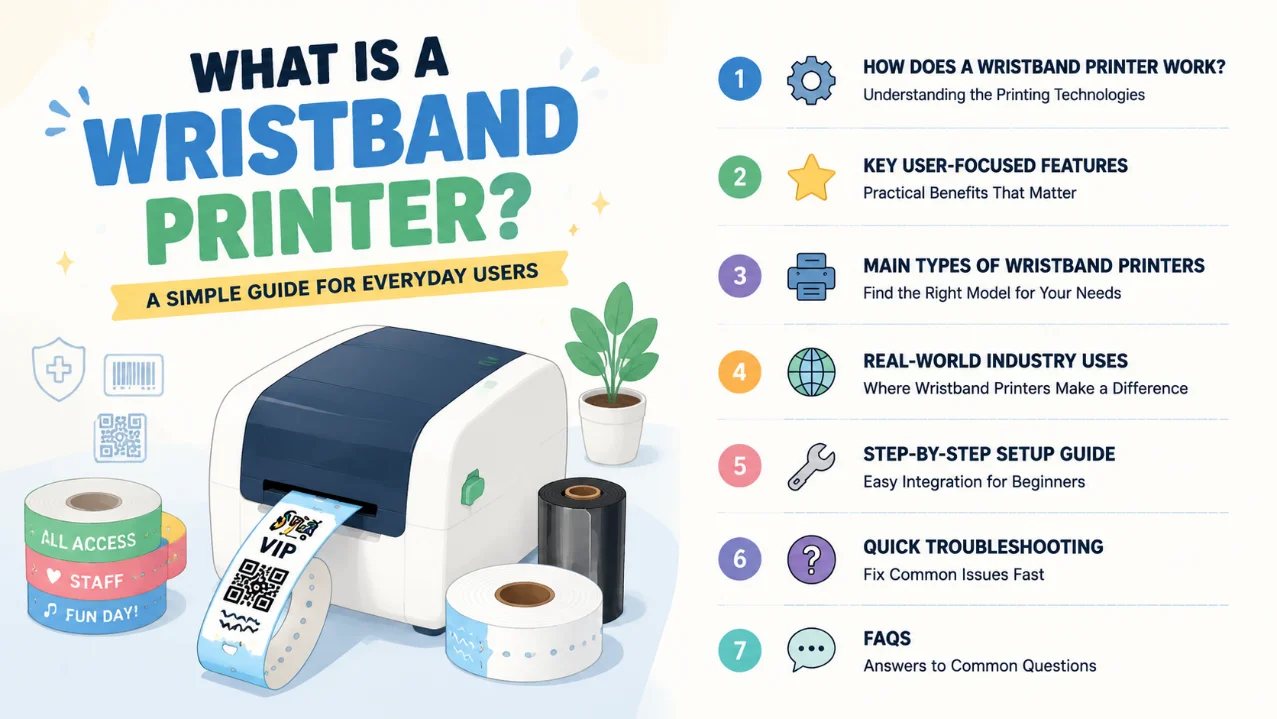
Standard home or office label printers cannot handle thin, flexible wristband rolls. They jam easily and produce blurry, non-waterproof prints that fail daily use.Facility managers, event planners and hospital staff used to order pre-printed wristbands in bulk, facing waste, stock shortages and limited custom options.
A dedicated wristband printer lets users print single or batch bands instantly with custom text, barcodes, QR codes and multi-color graphics.
This guide breaks down its core working logic, user-focused practical features, common printer categories, real-world applications, simple beginner setup and quick fault fixes, plus a full FAQ section.
1. How Does a Wristband Printer Work?
Two core printing technologies power all mainstream wristband printer units, each built for different user demands on durability and color output.
Direct Thermal Printing (Entry Event Wristband Printer)
Direct thermal models rely on heat-sensitive Tyvek or paper wrist stock without ink ribbons. From an event planner’s perspective, the biggest perk is low running costs and simple setup – no ribbon replacement work.
These units work perfectly for short-term single-day parties, concerts and pop-up activities. Most support adjustable print widths from 26mm up to 60mm and reach print speeds of around 203mm per second to speed up guest check-in.
Thermal Transfer Printing (Premium Color Wristband Printer)
Thermal transfer wristband printers use mixed-base ink ribbons to transfer long-lasting color onto PVC, synthetic and fabric wrist materials, making this the standard color wristband printer choice.
Prints resist water, sweat, alcohol and repeated wear for days or weeks, ideal for multi-day festivals and long-term hospital patient ID tracking.
They hit 300DPI high resolution for sharp logos, tiny medical data and scannable barcodes, with precise built-in sensors to avoid misaligned band rolls during batch printing.
2. Features of Wristband Printer
Every well-designed wristband printer prioritizes easy operation for non-technical staff, with these practical daily-use advantages:
- Dual print mode compatibility: Switch between direct thermal and thermal transfer to fit temporary or long-lasting wristband needs.
- Adjustable print width range: Supports 26mm to 60mm wide bands, covering slim medical ID tags and wide full-color event wristbands.
- 300DPI high resolution option: Delivers crisp multi-color graphics for branded event wristband designs.
- Multi-connection support: USB as standard, with optional Bluetooth, Wi-Fi, Ethernet and serial ports for PC, tablet and mobile printing.
- High-speed batch printing: Up to 203mm/s print speed to cut long guest check-in queues at large events.
- Precision media sensors: Automatically detect wristband roll edges to prevent wasted misprinted stock.
- Compact lightweight build: Small desktop footprint (under 1.7kg) for hospital nurse stations and portable event registration tables.
- Wide media compatibility: Works with Tyvek, PVC, paper and synthetic waterproof wristband rolls.
3. Main Types of Wristband Printer Machines
Users can pick a model based on their daily print volume and core industry needs:
Compact Direct Thermal Event Wristband Printer
Light, low-cost desktop units for small one-day events, gym access bands and temporary visitor passes. Simple paper-only media setup with no ribbon maintenance required for casual low-volume use.
Mid-Size Thermal Transfer Color Wristband Printer
The most versatile all-round model for hospitals, multi-day festivals and resorts. Supports color ribbon printing for branded graphics and durable waterproof bands, balancing speed, print quality and flexible media compatibility.
High-Volume Industrial Wristband Printer
Heavy-duty floor models for large hospital networks and massive concert venues printing thousands of bands daily, with extended roll capacity and continuous printing stability.
4. Real-World Industry Uses for Wristband Printer
A wristband printer streamlines identification workflows across countless sectors:
- Healthcare Facilities: Custom patient ID wristbands with names, medical IDs, allergy labels and scanable QR codes.
- Events & Festivals: Color entry bands, VIP passes and age verification tags (core use for event wristband printer).
- Water Parks & Resorts: Waterproof access bands for pool entry and activity tracking.
- Bars & Nightclubs: Age ID wristbands and private area access labels.
- Gyms & Spas: Member identification and session tracking bands.
- Corporate Events & Conferences: Attendee name and badge wristbands.
5. Step-by-Step Beginner Setup Guide
Setting up a wristband printer takes minutes for new operators, following these simple steps:
- Open the printer’s media compartment and adjust the width limit module to match your wristband roll size.
- Load Tyvek, PVC or thermal transfer band stock into the feeding frame and lock the limit switch.
- Install mixed ink ribbon if using a thermal transfer color wristband printer model.
- Connect the device to a computer or mobile device via USB, Bluetooth or Wi-Fi.
- Launch the included free editing software and select pre-built wristband templates for events or medical use.
- Customize text, barcodes and brand graphics, then print one test band to check alignment before batch runs.
6. Quick Troubleshooting for Common Wristband Printer Issues
These simple fixes resolve most daily malfunctions without professional repair calls:
- Faded pale band prints: Replace worn thermal ribbon or swap for fresh heat-sensitive wrist stock.
- Constant media jams: Re-adjust the width limit module and clear tiny wristband scraps from the feed track.
- Unscannable blurry barcodes: Clean the print head with alcohol wipes to remove ink and dust residue.
- Wireless connection failures: Re-pair Bluetooth/Wi-Fi devices and restart the printer power supply.
- Misaligned printed graphics: Recalibrate the built-in media sensor via the printer software settings.
Frequently Asked Questions (FAQs)
Standard label printers are built for flat adhesive roll stickers only. A dedicated wristband printer has a curved feeding path designed for flexible loop-style band stock, adjustable narrow width guides and specialized sensors to prevent jams on thin Tyvek/PVC material – features regular label printers lack entirely.
Yes. Thermal transfer color wristband printers use pigment ribbons that print waterproof, sweat-resistant graphics on synthetic media, perfect for multi-day outdoor festivals and water park venues. Direct thermal paper bands are only suitable for single-day indoor events.
No. All wristband printers come with free bundled editing software preloaded with event and medical wristband templates. Users only input text, upload logos and adjust sizes to finish custom designs quickly.
Weekly simple care: Wipe the print head to clear dust, remove leftover wristband scraps from the feeder, and replenish ribbon/media rolls when low. Replace worn print heads only after months of heavy daily printing. Choose a reliable thermal transfer printer manufacturer for better product quality and complete maintenance guidance.
Mid-size thermal transfer wristband printers work for both event and medical bands, as long as you use hypoallergenic medical-grade wrist stock and adjust template layouts for hospital patient data fields. Direct thermal paper bands are not recommended for long-term hospital patient tracking.
Conclusion
A wristband printer, including specialized event wristband printer and color wristband printer variants, is an essential compact printing tool for hospitals, event planners, resorts and leisure venues.
Unlike generic label printers, it is engineered exclusively for flexible loop-style identification bands, delivering instant custom printing without pre-order bulk stock waste.
Lightweight desktop models suit small one-day gatherings, while thermal transfer color-capable units handle multi-day festivals and permanent medical ID labeling with durable, vibrant prints.
With plug-and-play connectivity, pre-made editable templates and minimal maintenance, even staff with zero printer experience can produce professional, scannable wristbands for any identification scenario.


- Be Respectful
- Stay Relevant
- Stay Positive
- True Feedback
- Encourage Discussion
- Avoid Spamming
- No Fake News
- Don't Copy-Paste
- No Personal Attacks
- Be Respectful
- Stay Relevant
- Stay Positive
- True Feedback
- Encourage Discussion
- Avoid Spamming
- No Fake News
- Don't Copy-Paste
- No Personal Attacks
