What Is Thermal Paste | How It Works – Uses | Types & Application
Published: 15 Sep 2026
What is the work of Thermal paste? Thermal paste is a special paste used between the CPU and its cooler to help transfer heat. A CPU produces heat while it is working, and the cooler needs to remove this heat to keep the CPU at a safe temperature.
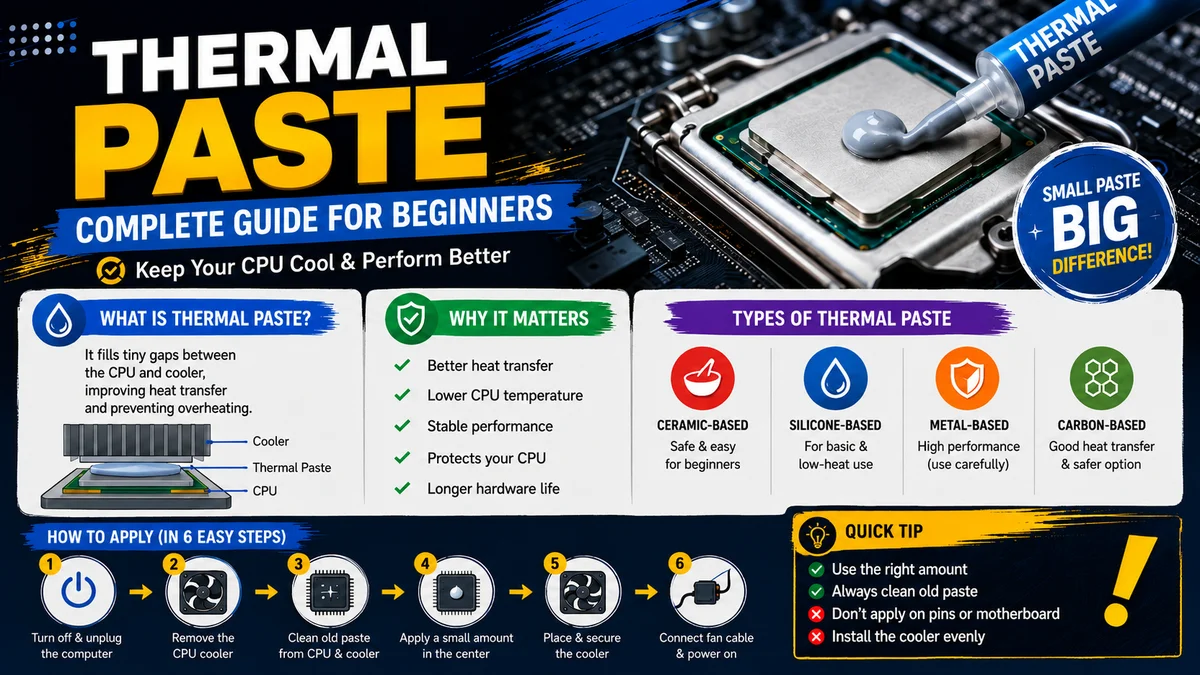
However, the surfaces of the CPU and cooler are not perfectly smooth, so tiny air gaps can remain between them. Thermal paste fills these tiny gaps and helps heat move more easily from the CPU to the cooler. In this way, thermal paste improves heat transfer and helps prevent the CPU from getting too hot.
What Happens Without Thermal Paste?
Without thermal paste, the CPU cannot transfer heat efficiently to the cooler. Tiny gaps between the CPU and cooler can trap air, which does not transfer heat well.
As a result, CPU temperature can rise quickly, especially when the computer is running heavy programs or games. The CPU may slow down to protect itself, and in severe cases, the computer may shut down unexpectedly. That is why proper thermal paste is important for keeping the CPU cool and stable.
Types of Thermal Paste
- Ceramic-Based Thermal Paste: Usually used for CPUs, GPUs, and general computer cooling. It is non-conductive, so it is a safer option for beginners.
- Silicone-Based Thermal Paste: Commonly used in basic electronics and low-heat applications. It is suitable where extreme cooling performance is not required.
- Metal-Based Thermal Paste: Used for high-performance CPUs and GPUs where better heat transfer is needed. Some metal-based pastes can conduct electricity, so they require careful application.
- Carbon-Based Thermal Paste: Used for CPUs and GPUs when good heat transfer is needed without the electrical conductivity risk of some metal-based pastes.
Note: A good-quality non-conductive ceramic or carbon-based thermal paste is generally easier and safer to use for beginners.
When Should Thermal Paste Be Replaced?
Thermal paste does not need to be replaced very often, but it can become dry or less effective over time. You should replace it when you remove the cpu cooler, when the old paste looks dry or cracked, or when the CPU starts running unusually hot.
Is thermal paste required for new cpus? It is also a good idea to apply fresh thermal paste when installing a new CPU or cooler. Replacing old paste can help the CPU transfer heat to the cooler more effectively.
How to Apply Thermal Paste
- Turn off the computer and unplug it from the power source.
- Carefully remove the CPU cooler.
- Clean the old thermal paste from the CPU and cooler.
- Make sure both surfaces are clean and dry.
- Apply a small amount of new thermal paste to the center of the CPU.
- Place the CPU cooler directly over the CPU.
- Secure the cooler properly so the paste spreads evenly.
- Reconnect the cooler’s fan cable before turning on the computer.
Common Mistakes When Applying Thermal Paste
- Using too much paste: A large amount does not mean better cooling. It can spread outside the CPU area.
- Using too little paste: Too little may not fill the tiny gaps between the CPU and cooler.
- Not cleaning old paste: New paste should be applied after properly cleaning the old paste.
- Applying paste to the wrong place: Thermal paste should only go between the CPU and cooler, not on the CPU pins or motherboard.
- Touching the paste: Avoid touching it with your fingers because dirt and oils can affect the contact.
- Installing the cooler incorrectly: The cooler should sit firmly and evenly on the CPU.
- Reusing old paste: If the cooler has been removed, clean the old paste and apply fresh paste instead.
Thermal Paste vs Thermal Pad
| Thermal Paste | Thermal Pad |
|---|---|
| Soft paste | Soft solid pad |
| Spread or applied between two surfaces | Placed between two surfaces |
| Used for CPUs and GPUs | Used for VRAM, VRMs, and some other components |
| Provides good heat transfer when applied correctly | Provides reliable heat transfer and fills larger gaps |
| Requires careful application | Easier to install |
| May need replacing after removing the cooler | Usually replaced when damaged or worn |
| Best for Very small gaps between CPU/gpu and cooler | Best for Larger or uneven gaps between components and heatsinks |
Advantages of Thermal Paste
- Improves Heat Transfer – It helps transfer heat from the CPU to the cooler more efficiently.
- Reduces CPU Temperature – Better heat transfer can help keep the CPU cooler.
- Prevents Air Gaps – It fills tiny gaps between the CPU and cooler surfaces.
- Helps Maintain Performance – Lower temperatures can help prevent the CPU from slowing down due to overheating.
- Easy to Apply – Thermal paste is simple to apply when installing or replacing a CPU cooler.
Disadvantages of Thermal Paste
- Needs Replacement – Thermal paste can dry out over time and may need to be replaced.
- Can Be Messy – Applying too much paste can make a mess around the CPU.
- Incorrect Application Can Cause Problems – Too little or too much paste may reduce heat transfer.
- Some Types Are Electrically Conductive – Certain metal-based thermal pastes can cause problems if they touch electrical contacts.
- Quality Varies – Low-quality thermal paste may not transfer heat as effectively as a good-quality paste.
Final Words
Thermal paste is a small but important part of a computer’s cooling system. It helps transfer heat from the CPU to the cooler by filling tiny gaps between their surfaces.
Without it, the CPU may become too hot and affect computer performance. Using the right amount of good-quality thermal paste and replacing it when needed can help keep the CPU cool, stable, and working properly. If anything is unclear, feel free to ask your questions in the comments below.
Frequently Asked Questions
Yes, thermal paste is really necessary for proper heat transfer between the CPU and its cooler. It fills tiny gaps between both surfaces and helps the cooler remove heat from the CPU.
CPU thermal paste is usually made from a base material mixed with heat-conductive materials. Common thermal pastes may contain silicone, metal oxides, carbon compounds, or other heat-conductive materials.
Thermal paste is generally not highly dangerous, but it should not be left on the skin for a long time. Avoid touching your eyes or mouth after handling it, and wash your hands with soap and water after use.
Thermal paste on a CPU should look like a thin, even layer covering the CPU surface. It should not be excessively thick or spread far outside the CPU.
Old thermal paste often looks dry, hard, cracked, or crusty instead of soft and smooth. This can reduce its ability to transfer heat effectively.
No, thermal paste is not edible. It is a computer component material and should never be eaten.
It is not made for consumption and contain chemicals or materials that can be harmful if swallowed. Thermal paste is often described as chalky, very chemical, and extremely bitter, with a strange smooth and greasy texture.
Some people who have accidentally or foolishly tasted it compare the flavor to sand-flavoured-toothpaste mixed with mineral oil, with a slight metallic or paint-like taste.
You can clean old thermal paste using isopropyl alcohol and a lint-free cloth or coffee filter. Gently wipe the CPU and cooler until the old paste is removed and the surfaces are clean.



- Be Respectful
- Stay Relevant
- Stay Positive
- True Feedback
- Encourage Discussion
- Avoid Spamming
- No Fake News
- Don't Copy-Paste
- No Personal Attacks
- Be Respectful
- Stay Relevant
- Stay Positive
- True Feedback
- Encourage Discussion
- Avoid Spamming
- No Fake News
- Don't Copy-Paste
- No Personal Attacks
