What is a Double Side ID Card Printer?
Published: 15 Sep 2026
If you manage corporate HR offices, school campuses, event venues or medical clinics, you will probably encounter a double side ID card printer, also widely referred to as a dual-sided ID card printer. Unlike basic single-sided plastic card printers that only print one surface, this specialized hardware automatically prints graphics, text and security data on both front and back of standard PVC ID cards without manual card flipping.
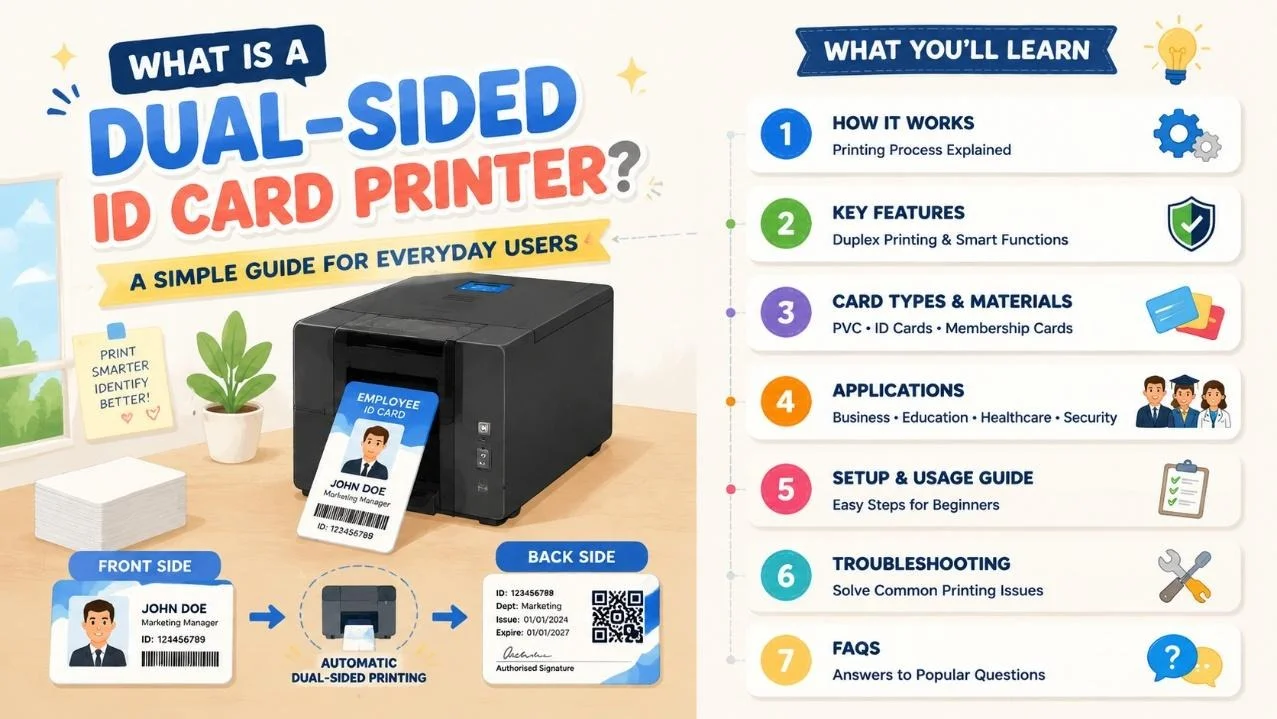
Many small teams used to rely on single-sided machines or outsourced printing shops, which created slow production, messy manual card turning and limited space for critical info like access codes, expiry dates and safety rules on card reverse sides. A dual-sided ID card printer solves these daily workflow frustrations, letting users produce complete, professional credentials in-house at any time.
This guide breaks down its printing mechanism, user-centric core features, common printer categories, real industry use cases, simple beginner setup steps and quick daily troubleshooting, plus a complete FAQ section for new operators.
How Does a Dual-Sided ID Card Printer Work?
Most commercial double side ID card printer units adopt thermal dye sublimation printing as the core technology, with an automatic internal flip mechanism as its key user advantage.
Dye Sublimation Duplex Printing Core Process
The printer feeds standard CR80 PVC cards into its internal path, first printing full-color photos, names and logos on the front surface at 300DPI resolution. A built-in mechanical flipper automatically reverses each card to print the back side with text, barcodes, QR codes or access data in one continuous cycle.
From an operator’s perspective, this fully automatic duplex function saves huge amounts of manual labor during bulk badge printing. Monochrome reverse prints finish in roughly 12 seconds per card, while full-color dual-sided output takes around 42 seconds each. The machine holds up to 100 blank PVC cards in its built-in feeder for uninterrupted batch runs, supporting common card thicknesses from 0.76mm to 1.0mm including magnetic, IC and RFID smart card stock.
Single-Sided Upgrade Duplex Models
Entry-level dual-sided ID card printer variants do not have internal flippers and require users to manually reload cards to print the second side. These low-cost options fit tiny offices with minimal monthly ID output, but create slower workflows for high-volume daily card issuance.
Features of a Double Side ID Card Printer
Every practical dual-sided ID card printer is built to cut down staff operation time and lower daily maintenance hassle:
- Automatic internal duplex flip system: No manual card turning required for two-sided full-color printing.
- 300DPI high-definition dye sublimation output: Sharp photos, tiny fine print and scannable security barcodes.
- Large 100-card auto input hopper: Eliminates frequent manual refilling during bulk event or campus printing jobs.
- Multi-card material compatibility: Works with plain PVC, magnetic stripe, contact IC and contactless RFID smart cards.
- Flexible multi-port connectivity: Standard USB connection, optional Ethernet and RS232 for office network integration.
- Optional security encoding modules: Add magnetic, chip or RFID writing functions for access control credentials.
- Compact desktop industrial frame: Fits standard office desks without occupying excessive workspace.
- Dedicated free editing software: Preloaded ID templates for employees, students and event name badges.
Main Types of Double Side ID Card Printer Machines
Buyers can select models based on daily card output volume and security needs:
Entry Manual Duplex Dual-Sided ID Card Printer
Budget desktop units without auto flip mechanisms, ideal for small startups and tiny clinics printing less than 50 badges monthly. Low upfront cost but slower for large batches.
Mid-Size Automatic Duplex Printer
The most widely used double side ID card printer, equipped with built-in card flippers and large feed bins. Perfect for medium corporations, K-12 schools and medium-scale conference event badge production.
High-Security Industrial Dual-Sided ID Card Printer
Heavy-duty models with all encoding options (magnetic, IC, RFID) and physical lock security, designed for government facilities, hospitals and large university campuses issuing hundreds of IDs daily.
Real-World Industry Uses for Dual-Sided ID Card Printer
A double side ID card printer streamlines secure identification workflows across multiple sectors:
- Corporate Offices: Dual-sided employee ID badges with front photos and back access control rules
- Education Campuses: Student ID cards with library data, meal plan codes printed on the reverse
- Conferences & Events: Two-sided attendee name tags with session schedules on card backs
- Medical Facilities: Staff and patient ID cards with safety compliance information
- Property & Security Companies: Guard access cards with site regulation text on reverse side
- Retail Membership Programs: Dual-sided loyalty cards with reward barcode on the back
Step-by-Step Beginner Setup Guide
Setting up a dual-sided ID card printer requires zero advanced technical knowledge:
- Unpack the machine and load CR80 standard PVC cards into the front auto feeder hopper.
- Install matching color or monochrome dye sublimation ribbon inside the print compartment.
- Connect the printer to your desktop via USB cable or optional Ethernet network wire.
- Install the free bundled ID design software on Windows operating systems.
- Select a pre-made card template, upload photos and fill in text/security barcode data.
- Enable duplex printing mode in software settings, send a test card to check alignment before bulk printing.
Quick Troubleshooting for Common Double Side ID Card Printer Issues
These simple fixes resolve most daily malfunctions without professional repair calls:
- Faded dull card prints: Replace exhausted dye sublimation ribbon and clean the 300DPI print head with cleaning wipes.
- Card jams during flip cycle: Clear bent PVC card scraps from the internal flipper track and adjust feeder guides.
- Back side misaligned printing: Recalibrate duplex flip sensor through the printer software control panel.
- computer fails to detect the printer: Reconnect USB/Ethernet cable and restart both device and PC.
- Unscannable magnetic/RFID data: Verify encoding module settings match your smart card stock type.
Frequently Asked Questions (FAQ)
Q1: What difference exists between a double side ID card printer and single-sided card printer?
A: A dual-sided ID card printer has an automatic internal flipper to print both card surfaces in one workflow. Single-sided printers only print one side, forcing staff to manually flip and reload every card to add reverse-side data, which drastically slows down bulk printing work.
Q2: Can this printer make smart RFID and chip access cards?
A: Mid-range and high-end double side ID card printer models support optional IC, magnetic stripe and RFID encoding modules, letting you print and program secure access credentials all in one device. Basic entry duplex printers only work with plain PVC cards without encoding functions.
Q3: Do I need graphic design skills to make custom two-sided ID badges?
A: No. All dual-sided ID card printers include free pre-built templates for employee, student and event badges. Users only fill in text, upload photos and toggle duplex printing mode without complex design work.
Q4: What regular maintenance does a duplex ID card printer need?
A: Weekly simple care: Wipe dust and ribbon residue off the print head, clear stuck card fragments from the flipper path, and replenish blank PVC cards and ribbons when running low. Choose a reliable ID card printer manufacturer for better product quality and complete maintenance guidance.
Q5: Is automatic duplex printing faster than manual two-sided printing?
A: Yes. The built-in flipper eliminates repeated manual card reloading, cutting total printing time by half for large batches of 50+ dual-sided ID badges.
Conclusion
A double side ID card printer, also known as a dual-sided ID card printer, is an essential dedicated printing device for any organization requiring secure, information-rich plastic credentials. Unlike basic single-sided card printers that create extra manual work, its automatic duplex flip system delivers complete two-sided badges efficiently in-house, removing the delays and inconsistent quality of outsourced card printing.
From small business HR departments to large university admin teams, there is a suitable duplex model matching every daily printing volume and security demand. With plug-and-play connectivity, pre-made editable ID templates and minimal weekly maintenance, even staff with zero printer experience can produce professional, compliant dual-sided identification cards quickly and reliably.

- Be Respectful
- Stay Relevant
- Stay Positive
- True Feedback
- Encourage Discussion
- Avoid Spamming
- No Fake News
- Don't Copy-Paste
- No Personal Attacks
- Be Respectful
- Stay Relevant
- Stay Positive
- True Feedback
- Encourage Discussion
- Avoid Spamming
- No Fake News
- Don't Copy-Paste
- No Personal Attacks
