What are Ruler Indents | Types and Mistakes Also Covered
Published: 15 Sep 2026
Many students try using the spacebar to adjust text, but still cannot get neat formatting. This confusion can be solved by understanding ruler indents and how they work.
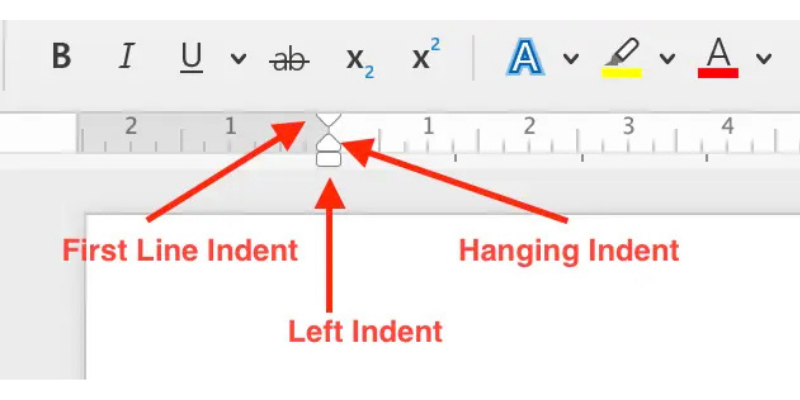
Ruler indents are parts of a ruler in a word processing program that help control where a paragraph starts and ends on a page.
They allow you to move text slightly inside from the left or right side to make your document neat and easy to read. Students often use ruler indents while writing essays, assignments, and projects.
What Is the Ruler in a Document?
The ruler in a document is a measuring bar shown at the top or side of a page in word processing software.
It helps you easily adjust margins, indents, and text alignment. By using the ruler, you can make your document look neat and properly formatted.
Types of Ruler Indents
There are four main types of ruler indents used in documents:
- First Line Indent: The first line of a paragraph moves slightly inside from the left margin, while the rest of the lines stay normal. It is commonly used in essays and school paragraphs.
- Hanging Indent: The first line stays at the margin, but all other lines move inside. This indent is often used in reference lists or bullet points.
- Left Indent: The entire paragraph moves inward from the left side of the page. It helps create space between the text and the page margin.
Common Mistakes Beginners Make
When learning ruler indents, beginners often make small mistakes that can make a document look messy. Here are some common ones:
- Many students press the spacebar many times to move text. This is incorrect. Always use ruler indents for proper formatting.
- Each ruler marker has a different job. Dragging the wrong triangle can change the whole paragraph layout.
- If you do not select the paragraph before adjusting the ruler, the indent may not apply where you want.
- Moving the marker too far can make text look uneven. Adjust it slowly for a neat result.
- Some beginners forget to check alignment after setting indents, which can make the page look unorganized.
Final Words
In this article, we learned what ruler indents are and how they help organize text in a document. By practicing ruler indents, students can make their assignments, essays, and projects look neat, professional, and easy to read.
If you still have any questions or concerns, feel free to ask in the comments section.



- Be Respectful
- Stay Relevant
- Stay Positive
- True Feedback
- Encourage Discussion
- Avoid Spamming
- No Fake News
- Don't Copy-Paste
- No Personal Attacks
- Be Respectful
- Stay Relevant
- Stay Positive
- True Feedback
- Encourage Discussion
- Avoid Spamming
- No Fake News
- Don't Copy-Paste
- No Personal Attacks
