9 Common Misconceptions & Myths About Delete
Published: 15 Sep 2026
Have you ever pressed the Delete button and thought your file was gone forever? Many of us are confused about it. That’s the reason I always say that the digital world is insecure.
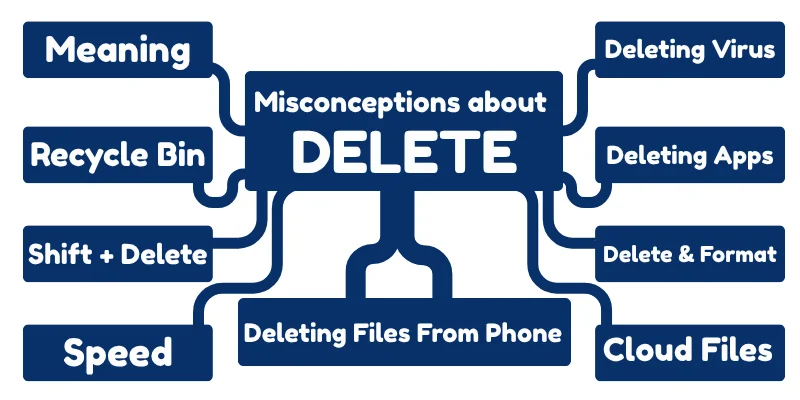
In this article, we will uncover 9 common misconceptions about Delete that most people believe. You will learn the truth about deleting files, how the Recycle Bin and Trash work, what happens with Shift + Delete, apps, viruses, and even cloud storage.
1. Delete Meaning
Many beginners believe that when they press the Delete button, the file disappears forever. This is one of the biggest computer myths.
In reality, most deleted files are not removed permanently – they are only moved to a temporary storage area where they can still be recovered. Understanding this helps you avoid losing important data accidentally.
2. Recycle Bin
Many students think that files placed in the Recycle Bin are automatically deleted forever after some time. However, this is not true. The Recycle Bin keeps deleted files safely until you manually empty it or it becomes full, which means you can still restore your files if you deleted them by mistake.
3. Shift + Delete
Many users believe that pressing Shift + Delete permanently destroys a file and makes it impossible to recover.
In reality, this shortcut only skips the Recycle Bin, but the data may still remain on the storage device. With special recovery software, deleted files can sometimes be restored until new data overwrites them.
4. Speed
Many people believe that deleting files will instantly make a computer faster. While removing unnecessary files can free up storage space, it does not immediately improve speed. Computer performance mainly depends on factors like RAM, processor power, and background programs running on the system.
5. Delete vs Format
Many beginners think that Delete and Format mean the same thing, but they are different actions. Deleting removes selected files or folders, while formatting prepares an entire storage device by removing all data and resetting its file system. Formatting affects the whole drive, not just individual files.
6. Deleting Files From Phone
Many people think that files deleted from a phone disappear forever immediately. In reality, most smartphones move deleted photos, videos, or files to a Trash or Recently Deleted folder first. These files stay there for a limited time, allowing you to restore them if they were deleted by mistake.
7. Deleting Virus Files
Many beginners believe that simply deleting a virus file will remove the virus completely from the computer. However, viruses often hide in different system locations and may continue running in the background. Proper antivirus software is usually needed to fully detect and remove malicious programs.
8. Deleting Apps
Many people think that uninstalling an app deletes all its data from the device. In reality, some leftover files, caches, or settings may remain even after the app is removed. To completely clear an app’s data, you may need to manually delete its storage files or use a cleanup tool.
9. Cloud Files
Many beginners assume that deleting a file from their device also removes it from the cloud. However, most cloud services keep a backup copy of deleted files for a certain period. This means you can often recover the file from the cloud even after deleting it from your phone or computer.
Final Words
In this article, we explored 9 common misconceptions about Delete. We learned that deleting a file doesn’t always mean it’s gone forever, how the Recycle Bin and Trash work, the truth about Shift+Delete, apps, viruses, and cloud storage.
Warning: Don’t click any nude pictures of yourself or others, and avoid sharing private data everywhere in the digital world. Stay Alert! Understanding these facts helps you handle your files safely and avoid accidental data loss.
If anything is still confusing or if you have questions about deleting files on your computer or phone, feel free to ask in the comments. Don’t worry, no question is too small!


- Be Respectful
- Stay Relevant
- Stay Positive
- True Feedback
- Encourage Discussion
- Avoid Spamming
- No Fake News
- Don't Copy-Paste
- No Personal Attacks
- Be Respectful
- Stay Relevant
- Stay Positive
- True Feedback
- Encourage Discussion
- Avoid Spamming
- No Fake News
- Don't Copy-Paste
- No Personal Attacks
