What is Cursor in Computer | Types & Functions
Published: 26 Apr 2026
A cursor is a small moving symbol shown on a computer screen that indicates where the next action will happen. It shows the position where you can type text, select items, or click using the mouse.
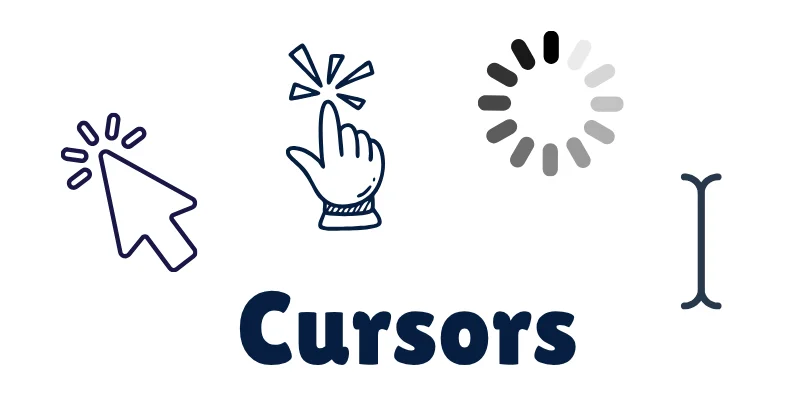
The cursor helps users interact easily with the computer by showing the exact working location on the screen.
Types of Cursor
Different tasks on a computer show different types of cursors. Each cursor has a special shape that tells us what action we can perform.
- Text Cursor (I-Beam Cursor): A blinking vertical line that appears while typing text. It shows where the next letter will be written.
- Mouse Pointer (Arrow Cursor): The most common cursor shaped like an arrow. It is used to select files, open programs, and click buttons.
- Hand Cursor: Appears when the pointer moves over a clickable link or button. It shows that you can click to open something.
- Loading Cursor (Busy Cursor): Looks like a spinning circle or hourglass. It tells us the computer is working and we should wait for a moment.
Importance & Function of Cursor
The cursor is very important because it helps users control and interact with the computer easily. Without a cursor, it would be difficult to know where our action is taking place on the screen.
Why the Cursor Is Important:
- Helps in typing at the correct position.
- Makes selecting text and files easy.
- Allows users to click buttons and open programs.
- Shows the current working location on the screen.
- Makes computer use simple and user-friendly.
Final Words
The cursor is a small but very important part of a computer screen. It helps us know where we are typing, clicking, or working at any moment. If you still have any confusion, feel free to ask in comments.

- Be Respectful
- Stay Relevant
- Stay Positive
- True Feedback
- Encourage Discussion
- Avoid Spamming
- No Fake News
- Don't Copy-Paste
- No Personal Attacks
- Be Respectful
- Stay Relevant
- Stay Positive
- True Feedback
- Encourage Discussion
- Avoid Spamming
- No Fake News
- Don't Copy-Paste
- No Personal Attacks
