What is Computer Hardware | Four Main Categories With Examples
Published: 22 Jan 2026
A computer is not magic. Just like our body has different parts that work together, a computer also has physical parts that help it work. These parts are called computer hardware.
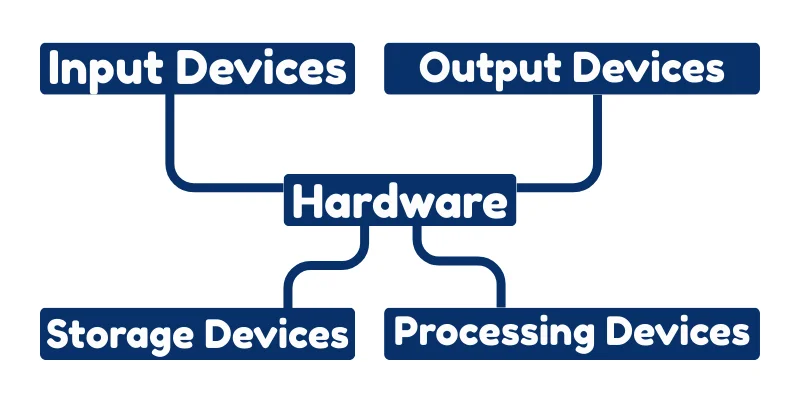
In this article, we will clear all your confusion and understand what computer hardware is, its types, and why it is so important, in very easy words, specially for beginners.
Types of Computer Hardware:
Computer hardware can be classified into different types based on the work they do. Each type of hardware has a special role in helping the computer work properly. we will talk about four main types of computer hardware:
- Input Devices
- Output Devices
- Processing Devices
- Storage Devices
Input Devices?
Input devices are the parts of a computer that help us enter data and instructions into the computer. Simply, input devices allow us to tell the computer what to do.

When we type, click, speak, or scan something, the computer receives this information through input devices. Without input devices, we cannot give commands to the computer, so it cannot work properly.
- Keyboard is used to type letters, numbers, and symbols into the computer.
- Mouse is used to point, click, and select items on the screen.
- Microphone is used to record voice or give voice commands to the computer.
- Scanner is used to copy text or pictures from paper into the computer.
- Webcam is used to capture photos and videos and send them to the computer.
What Are Output Devices?
Output devices are the parts of a computer that show the results of the work done by the computer.

When we give data to the computer using input devices, the computer processes it and then sends the result through output devices.
These devices help us see, hear, or get a printed form of information from the computer.
- Monitor displays text, pictures, and videos on the screen.
- Printer prints documents and images on paper.
- Speakers produce sound such as music and voice from the computer.
- Headphones allow users to listen to sound privately.
What Are Processing Devices?
Processing devices are the parts of a computer that think and make decisions. They take the data we give through input devices, process it according to instructions from software, and send it to output devices as results.
In simple words, processing devices are the brain of the computer, making sure everything works correctly and quickly. Without them, the computer cannot understand or use the data we give.
- CPU (Central Processing Unit): Processes instructions and performs calculations; called the brain of the computer.
- GPU (Graphics Processing Unit): Handles images, videos, and graphics processing for smoother visuals.
- Motherboard: Connects all hardware and allows them to communicate with each other.
- RAM (Random Access Memory): Temporarily stores data and instructions for fast access while the computer is running.
- ROM (Read-Only Memory): Stores important instructions permanently, even when the computer is off.
What Are Storage Devices?
Storage devices are the parts of a computer that save data and information so that we can use it later. They keep everything from documents and pictures to videos and software programs.
Some storage is temporary (used only while the computer is running), while some is permanent (keeps data even when the computer is turned off). Without storage devices, a computer would forget everything the moment it is turned off!
- Hard Disk Drive (HDD): Stores large amounts of data permanently for long-term use.
- Solid State Drive (SSD): Faster storage for programs and files, improves computer speed.
- USB Flash Drive: Portable storage to transfer data between computers.
- CD / DVD: Stores music, videos, and files that can be read by a CD/DVD drive.
- Memory Card: Small storage used in cameras, phones, and tablets.
- RAM (Temporary Storage): Stores data temporarily while the computer is running for quick access.
Difference Between Hardware and Software
| Hardware | Software |
|---|---|
| Physical parts of the computer that you can see and touch. | Programs and instructions that tell the computer what to do. |
| Examples: keyboard, monitor, cpu, Printer. | Examples: Microsoft Word, Google Chrome, Games. |
| Hardware cannot work without software. | Software cannot work without hardware. |
| Permanent in nature (physical presence). | Intangible; cannot touch or see physically. |
| Provides the structure and support for computer tasks. | Provides instructions and logic for computer tasks. |
Final Words
Computer hardware is very important because without it, a computer cannot work at all. Just like our body needs hands, eyes, and brain to do anything, a computer needs hardware to function.
Input devices help us give commands, processing devices think and make decisions, storage devices remember information, and output devices show the results.
Good hardware makes the computer fast, reliable, and efficient, while damaged or weak hardware can make it slow or stop working. In short, computer hardware is the foundation that makes all computing possible.

- Be Respectful
- Stay Relevant
- Stay Positive
- True Feedback
- Encourage Discussion
- Avoid Spamming
- No Fake News
- Don't Copy-Paste
- No Personal Attacks
- Be Respectful
- Stay Relevant
- Stay Positive
- True Feedback
- Encourage Discussion
- Avoid Spamming
- No Fake News
- Don't Copy-Paste
- No Personal Attacks
