Basic Parts of a Mouse | External and Internal
Published: 1 Mar 2026
Have you ever wondered what happens when you click a mouse button or move it across your desk? How does the computer instantly understand your actions? Many people use a mouse every day, but very few know how it actually works.
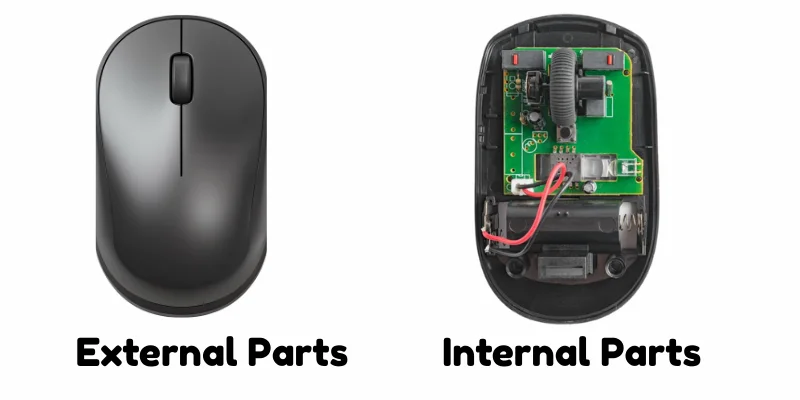
Buddies! In this article, we will explore the main parts of a mouse, By the end, you will understand the function of each part of mouse clearly.
We divide parts of mouse into two categories for better understanding:
- External Parts of mouse
- Internal Parts of Mouse
External Parts of Mouse
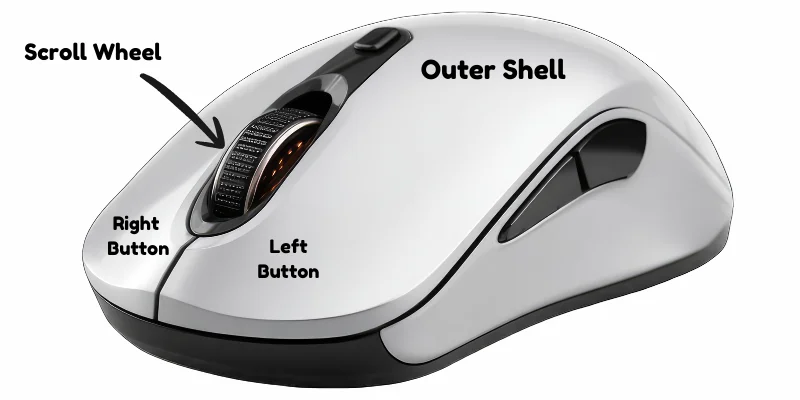
In this section we will learn about 4 basic external parts of a mouse. let’s take a look.
1. Left Button
The left button is the main and most frequently used button of a mouse. It is used to select items, open files and programs, and click on links. A single click selects something, while a double-click opens it. Almost every basic task on a computer starts with the left mouse button.
2. Right Button
The right button is used to open a shortcut menu, also called a context menu. When you right-click on a file, folder, or desktop, it shows different options related to that item, such as copy, paste, rename, or delete. It helps users access additional commands quickly without opening multiple menus.
3. Scroll Wheel
The scroll wheel is the small rotating wheel located between the left and right buttons of a mouse. It is mainly used to move up and down on a webpage or document without dragging the scrollbar. In many applications, the scroll wheel can also be pressed like a button or used to zoom in and out.
4. Body / Shell
The body or shell is the outer covering of the mouse that holds all its internal components together. It protects the internal parts from dust and damage while providing a comfortable grip for the user. The shape and design of the body help users move the mouse easily and smoothly.
Internal Parts of Mouse
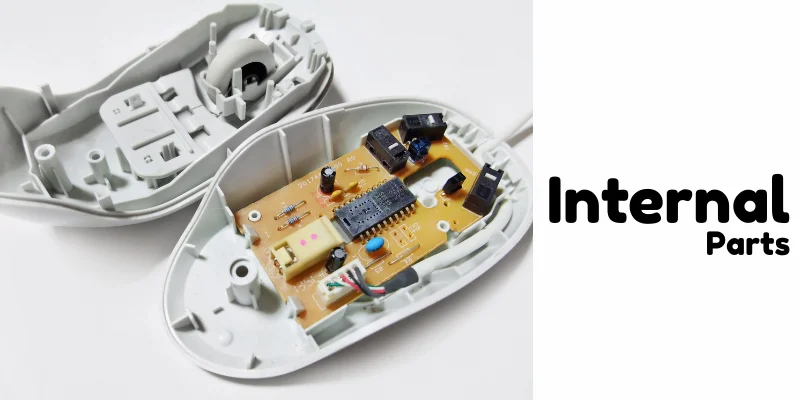
In this section we will learn about 4 basic internal parts of a mouse. let’s take a look.
1. Microcontroller
The microcontroller is the main control unit inside a mouse. It acts like the brain of the mouse, processing signals from the buttons and sensor.
When you click or move the mouse, the microcontroller converts those actions into digital signals and sends them to the computer. Without it, the mouse cannot communicate or function properly.
2. Circuit Board
The circuit board, also known as a Printed Circuit Board (PCB), is the main platform inside the mouse where all electronic components are connected.
It holds parts like the microcontroller, sensor, and switches, allowing them to communicate with each other. The circuit board ensures that electrical signals flow properly so the mouse can work smoothly and accurately.
3. Switches
Switches are small mechanical components inside the mouse that register your clicks. Each time you press the left or right button, a switch sends a signal to the microcontroller. These switches are designed to respond quickly and accurately, ensuring smooth and reliable clicking performance.
4. LED / Laser Light
The LED or laser light is located at the bottom of the mouse and helps detect movement. It shines light onto the surface, and the sensor tracks how the light reflects back.
This allows the mouse to accurately detect direction and speed when you move it. Without this light, the mouse would not be able to track movement properly.
Final Words
In this article, we discussed the main external parts of a mouse, such as the left button, right button, scroll wheel, and body, along with important internal parts like the microcontroller, circuit board, switches, and LED or laser light.
Each part has a specific role that helps the mouse work smoothly and accurately. My personal advice is that you should not just use computer devices, try to understand how they work.


- Be Respectful
- Stay Relevant
- Stay Positive
- True Feedback
- Encourage Discussion
- Avoid Spamming
- No Fake News
- Don't Copy-Paste
- No Personal Attacks
- Be Respectful
- Stay Relevant
- Stay Positive
- True Feedback
- Encourage Discussion
- Avoid Spamming
- No Fake News
- Don't Copy-Paste
- No Personal Attacks
