Arithmetic Logic Unit (ALU) | Working | History & Difference
Published: 13 Feb 2026
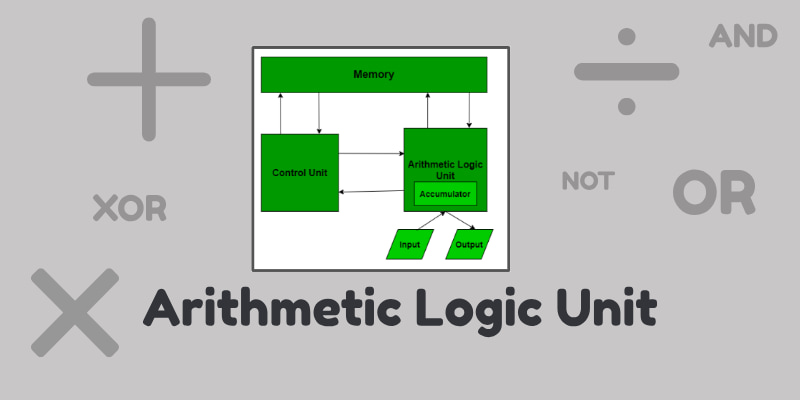
The Arithmetic Logic Unit (ALU) is an important part of a computer’s cpu. It is the place where all calculations and thinking work happens.
Working
The Arithmetic Logic Unit (ALU) works as the calculation and decision-making core of the CPU. It receives data from computer memory (registers) and instructions from the Control Unit.
Based on the instruction, the ALU knows whether it must perform a mathematical operation (like addition or subtraction) or a logical operation (like comparison or checking conditions).
- Step 1: First, the required numbers (called operands) are sent into the ALU.
- Step 2: The ALU then uses electronic circuits such as adders, subtractors, and logic gates to process the data.
For example, during addition, binary adders combine bits step by step while managing carry values. For logical tasks, gates like AND, OR, and NOT compare binary values.
After processing, the ALU sends the final result back to registers or memory, where it can be used for further operations or shown as output. This entire process happens in nanoseconds, allowing computers to perform millions of operations per second.
How its concept become
The basic concept of the Arithmetic Logic Unit (ALU) was given by a mathmetician John von Neumann in the 1945. He explained that a computer should have a special part to do all calculations and logical thinking. This idea later became a standard design for modern computers.
What type of functions do ALUs support?
In this section, we will learn about the different types of functions an ALU can perform. From basic operations to logical decisions and bit manipulation, Let’s explore how it works step by step.
1. Arithmetic Functions
These are operations that deal with numbers:
- Addition (+): adds two numbers
- Subtraction (−): subtracts one number from another
- Multiplication (×): multiplies numbers (in some ALUs)
- Division (÷): divides numbers (in some ALUs)
- Increment / Decrement: adds or subtracts 1
- Negation / Two’s complement: changes sign of a number
2. Logical Functions
These are operations that deal with true/false or bit-level decisions:
- AND: outputs 1 only if both inputs are 1
- OR: outputs 1 if at least one input is 1
- NOT: inverts the input (1→0, 0→1)
- XOR (Exclusive OR): outputs 1 if inputs are different
- Comparison: checks if numbers are equal, greater, or smaller
3. Shift & Bit Manipulation
- Left/Right shift: moves bits left or right (used in multiplication/division by powers of 2)
- Rotate: rotates bits around
- Masking: selects specific bits of data
First Single-Chip ALU in History
The world’s first popular single-chip ALU (Arithmetic Logic Unit) was introduced in 1970 by Texas Instruments.
It was called the 74181 ALU chip, and it could perform many arithmetic and logical operations all on one small integrated circuit.
Before this, ALU functions needed many separate components. The 74181 changed everything by putting the whole ALU onto one chip, making computers smaller, faster, and cheaper.
ALU Inside First Microprocessor
Soon after that, in 1971, Intel launched the Intel 4004 microprocessor, which had an ALU built directly inside the CPU chip.
This was a huge step toward modern computers and smartphones.
Computers With an ALU
Nowadays almost all computers have an ALU because it is a basic part of the CPU. This includes:
- Personal computers (PCs): laptops and desktops
- Servers: big computers that store data and run websites
- Smartphones and tablets: even your mobile phone has an ALU inside its CPU
- Embedded systems: devices like calculators, smart watches, and some home appliances
In short, any device that does calculations or runs programs has an ALU, because it’s the part that handles math and logical thinking.
Computers Without an ALU
Early Mechanical Computers
- Machines like Charles Babbage’s Difference Engine (1822) and Analytical Engine were purely mechanical.
- They could do simple calculations using gears and levers but did not have an electronic ALU.
Some Early Electronic Computers
- Some of the first electronic machines in the 1930s -1940s, like Zuse Z3, did limited arithmetic but didn’t have a dedicated ALU as we know it today.
- They relied on separate circuits or relay logic for calculations.
Difference among the ALU, CPU, GPU and NPU?
In this section, we will explore the differences between ALU, CPU, GPU, and NPU.
Each of these computer units has a special role, and understanding them helps us see how computers process data, graphics, and AI tasks efficiently.
ALU
The ALU (Arithmetic Logic Unit) is the part of the CPU that handles all calculations and logical decisions. It adds, subtracts, compares numbers, and performs bit operations. Think of it as the “math and brain work section” of a computer.
CPU
The CPU (Central Processing Unit) is the main processor of a computer that controls all operations. It directs data, runs programs, and uses the ALU to perform calculations. Basically, it’s the “brain” of the computer that makes everything work together.
GPU
The GPU (Graphics Processing Unit) is specialized for processing images, videos, and graphics. Unlike the CPU, it can handle thousands of calculations at the same time, making it perfect for games, animations, and AI tasks.
NPU
The NPU (Neural Processing Unit) is designed specifically for AI and machine learning tasks, like recognizing faces or understanding voice commands. It works faster than a CPU or GPU for AI because it’s built to process neural network calculations efficiently.
Final Words
In this article, we learned about the Arithmetic Logic Unit (ALU), what it is, how it works, and the important functions it performs in a computer.
Understanding ALU helps us see how computers think, calculate, and make decisions, which is the foundation of all technology we use today.
My personal advice: always stay curious about how things work inside computers, even simple parts like the ALU show us the amazing power of human invention! If you have any question, you can ask me in comments section, Thanks for your love and support ❤️.
FAQs
In this FAQs section, we answer some common and interesting questions about the Arithmetic Logic Unit. These quick answers will help clear doubts and deepen your understanding.
Size of an ALU (like 8-bit, 32-bit, or 64-bit) decides how much data it can process at one time. A larger ALU can handle bigger numbers in a single step,
which makes calculations faster and improves overall performance. That’s why modern computers with 64-bit ALUs are much quicker than old systems.
Simple ALU can only perform basic operations like addition, subtraction, and simple logic.
Modern ALU can do complex math, fast bit operations, handle large data sizes, and work together with multiple processing units. In short, modern ALUs are faster, smarter, and more powerful.
Yes! Most modern CPUs contain multiple ALUs. This allows the processor to perform many calculations at the same time, which greatly increases speed and multitasking performance.
That’s one big reason today’s computers are so fast.
When numbers are too big, the ALU processes them in small parts (chunks) using multiple steps. The CPU stores parts of the number in registers or memory and combines the results gradually.
This way, even extremely large calculations can be completed accurately.
ALU status flags are small indicators that show the result of an operation, such as whether the answer is zero, negative, too large (overflow), or correct.
They are important because the CPU uses them to make decisions, like repeating a step or jumping to another instruction in a program.
ALU mainly works with whole numbers (integers) and logical operations like AND and OR.
The FPU is specially designed to handle decimal numbers and very large or very small values, which are common in scientific calculations, graphics, and engineering tasks.
ALU itself uses only a small amount of power, but since it works millions or billions of times per second, the total power usage can become noticeable. Modern processors are designed to make ALUs very energy-efficient to save battery life and reduce heat.
Mobile processors’ ALUs are designed to use less power and produce less heat so batteries last longer.
Desktop ALUs focus more on maximum speed and performance, even if they use more electricity. In short, mobile ALUs are energy-efficient, while desktop ALUs are performance-focused.
Basic ALUs perform fixed operations like addition and AND logic, but modern processors can be designed to support special instructions for specific tasks.
Some advanced systems even allow custom ALU-like units for graphics, encryption, or AI processing. However, normal users don’t directly reprogram the ALU itself.
The speed of an ALU is limited by the clock speed of the CPU, heat generation, and how fast electrical signals can move through circuits.
If it runs too fast, it can overheat or cause errors. That’s why engineers balance speed with power and cooling.



- Be Respectful
- Stay Relevant
- Stay Positive
- True Feedback
- Encourage Discussion
- Avoid Spamming
- No Fake News
- Don't Copy-Paste
- No Personal Attacks
- Be Respectful
- Stay Relevant
- Stay Positive
- True Feedback
- Encourage Discussion
- Avoid Spamming
- No Fake News
- Don't Copy-Paste
- No Personal Attacks
