What is a Printer Drum | Working – Types | Location & Life
Published: 15 Sep 2026
A printer is a useful machine that helps us print words and pictures on paper. Inside a printer, there are many important parts that work together to produce clear and neat prints.
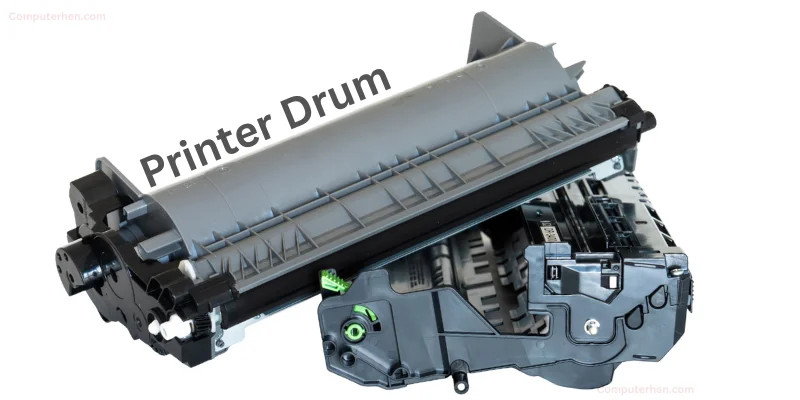
One of these important parts is called the printer drum, which plays a necessary role in the printing process by ensuring it that toner hits the right spots on paper, especially in laser printers.
- It works with toner powder to create clear prints.
- Shaped like a round cylinder.
- It does not contain ink itself,
- but its Job in printing is carrying the image before it is printed on the paper.
How Does a Printer Drum Work?
The printer drum works through a simple printing process that uses light and electricity. The steps are easy to understand:
- The drum first gets a special electric charge,
- A laser beam draws the required text or image on the drum,
- Toner powder sticks only to the drawn areas,
- Paper moves through the printer,
- With the help of toner, image is transferred from the drum onto the paper.
Why Is It Called a “Drum”?
It is called a “drum” because its shape is round, just like a real drum. The printer drum looks like a long cylinder and rotates while printing. Because it rolls and works in a circular motion, it is given the name printer drum.
Where Is the Printer Drum Located?
The printer drum is located inside the printer, so it cannot be seen from the outside. It is placed near the toner cartridge and works closely with it during printing.
In many laser printers, the drum is either attached to the toner cartridge or kept as a separate drum unit inside the printer. Because it is an internal part, the printer must be opened carefully to see or replace the drum.
After this, the paper goes through heat so the print becomes permanent and clear.
Difference Between Toner and Drum
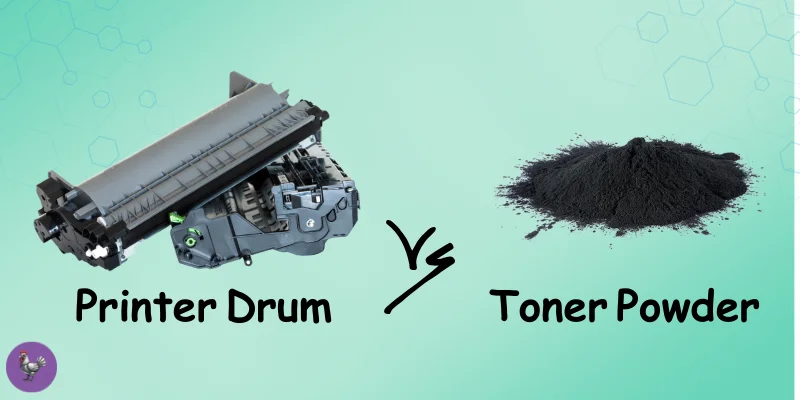
Although the toner and drum work together, they have different jobs in a printer.
Toner
- Toner is a fine powder that acts like ink and forms the text and images
- Toner finishes faster and needs frequent replacement
- Toner provides color or black print
Drum
- Drum helps transfer the toner image onto the paper
- Drum lasts longer and is replaced less often
- Drum supports the printing process but does not add color
If you want to learn more in detail about thier main working difference, here is Article for you: Difference Between Printer Toner and Printer Drum
Types of Printer Drums
Printer drums come in different forms depending on the printer design. The main types are:
- Built-in Drum
The drum is combined with the toner cartridge and is replaced along with the toner. - Separate Drum Unit
The drum is a separate part and is changed only when it becomes old or damaged. - OPC (Organic Photo Conductor) Drum
A commonly used drum type that is light-sensitive and helps create clear prints.
How Long Does a Printer Drum Last?
A printer drum usually lasts much longer than a toner cartridge. It can print thousands of pages before needing replacement.
The life of a printer drum depends on how often the printer is used and how well it is handled. When the drum becomes old or worn out, the print quality starts to decrease, which means it is time to replace it.
Signs of a Bad Printer Drum
When a printer drum is old or damaged, it can affect printing. Here are the common signs of a bad printer drum:
- Black lines or streaks appear on the paper
- Faded printing or light text
- Spots or marks that shouldn’t be there
- Uneven text or images
- Paper jams may happen more often
- Strange noises inside the printer during printing
If you notice any of these, it’s a sign that the drum needs cleaning or replacement.
| Advantages of a Printer Drum |
|---|
|
| Disadvantages of a Printer Drum |
|---|
|
Care and Safety Tips for a Printer Drum
- Do not touch the drum surface with your fingers
- Keep it away from sunlight – light can damage it
- Handle gently when installing or replacing
- Clean carefully if needed, following printer instructions
- Replace the drum when print quality decreases
Final Words:
So, guys, we have learned all about the printer drum; what it is, where it is located, how it works, and how it helps toner create clear prints on paper.
We also saw the difference between a drum and toner, the types of printer drums, how long they last, and the signs of a damaged drum. Plus, we covered its advantages, disadvantages, and simple care tips to keep it working well.
I hope all confusions are clear, if not then you can ask me in the comments section, Keep learning, stay curious, and enjoy exploring with me. Thanks for your Love.
FAQ’s
Yes, sometimes a printer drum can be cleaned to improve print quality, especially if dust or toner powder is stuck on it. Many printers even have a drum cleaning mode in their settings.
However, cleaning only helps for a short time. If the drum is old or scratched, it cannot be fixed by cleaning and must be replaced.
The basic working principle is the same in both printers, the drum uses electric charge and laser light to hold toner and transfer images to paper.
The difference is that color printers use multiple drums or one drum for each color (cyan, magenta, yellow, black), while black-and-white printers usually use one drum only.
So the process is the same, just more colors involved.
If you keep printing after the drum is worn out:
• Print quality becomes poor (lines, faded text, spots)
• Pages may come out dirty or uneven
• The printer may start showing error messages
• In some cases, it can stress other parts of the printer
At first it might still print, but over time the results get worse, so replacing the drum is the best solution.
Yes, a damaged printer drum can affect other parts of the printer.
When the drum is scratched or worn out, it may spread toner unevenly, which can dirty the rollers and inside of the printer. Over time, this can cause paper jams, messy prints, and extra wear on parts.
So changing a bad drum on time helps protect the whole printer.
Most modern printers let you check drum life easily:
• Go to the printer’s menu or settings screen
• Look for Maintenance, Supplies, or Parts Status
• There you’ll see Drum Life Remaining or Page Count
Some printers also show this on your computer when you open printer software. It helps you know when the drum is getting old before problems start.
Printer drums are usually brand-specific and model-specific.
This means a drum made for HP may not work in Canon or Brother printers — and even within the same brand, different models use different drums.
Always use the exact drum type recommended for your printer to avoid damage or errors.
Printers don’t wait until the drum is completely bad, they use a page counter or timer to estimate drum life.
So when the drum reaches its expected limit (like 10,000–20,000 pages), the printer shows a warning even if prints still look fine.
It’s just a safety reminder to replace it soon before quality drops suddenly.
Both have pros and cons, take a look:
Built-in drum (with toner):
✔ Easier to replace
✔ Less technical hassle
❌ Costs more over time because you replace drum again and again
Separate drum unit:
✔ Cheaper in the long run (you change only toner often)
✔ Drum lasts much longer
✔ Usually better for heavy printing
❌ Slightly more complex to replace
Yes, it can, especially low-quality toner.
Cheap or refilled toner may:
• Contain rough particles that scratch the drum
• Spread unevenly and dirty the drum surface
• Reduce drum life faster
Good toner protects the drum and keeps prints clean. Cheap toner may save money now but cost more later in repairs or replacements.



- Be Respectful
- Stay Relevant
- Stay Positive
- True Feedback
- Encourage Discussion
- Avoid Spamming
- No Fake News
- Don't Copy-Paste
- No Personal Attacks
- Be Respectful
- Stay Relevant
- Stay Positive
- True Feedback
- Encourage Discussion
- Avoid Spamming
- No Fake News
- Don't Copy-Paste
- No Personal Attacks
