What is Ruler in Computer | Ruler Indents | MS Word & Google Docs
Published: 15 Sep 2026
A ruler in a computer is a digital measurement tool used in software applications to help users align and measure text, images, and other objects on the screen. Unlike a physical ruler, it appears on the top or side of the workspace and is mainly used for formatting and layout control.
In MS word:
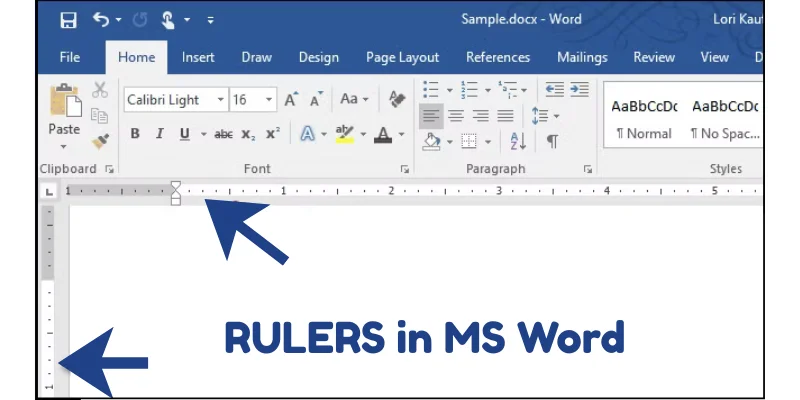
Rulers can be horizontal or vertical and usually measure in units such as inches, centimeters, or points. By using the ruler, documents look more organized, professional, and visually balanced.
In Google Docs:
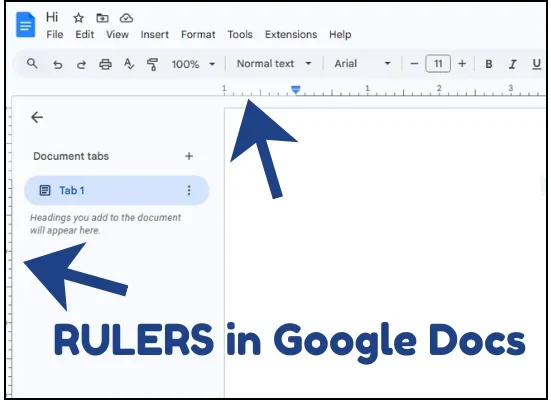
How we can use a ruler using its indents?
What are Ruler Indents? ruler indents are small markers on the horizontal ruler that control where text starts and how paragraphs are aligned.
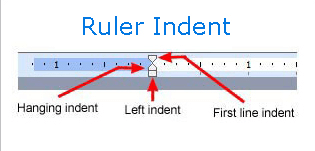
- Left Indent: Moves the entire paragraph away from the left margin. All lines of the paragraph shift together.
- First Line Indent: Moves only the first line of a paragraph to the right, while the rest of the lines stay in place. It is often used at the beginning of essays or stories.
- Hanging Indent: The opposite of first line indent. The first line stays at the margin, but all other lines move to the right. It is commonly used in reference lists or bibliographies.
Is There is any Vertical Indent?
No! there are no vertical indents. Indent options (Left, First Line, Hanging) only work horizontally, If you want to move text up or down (vertical spacing), you use:
- Line Spacing
- Paragraph Spacing (Before/After)
- Top and Bottom Margins
Final Words
In this article, we learned what a ruler in a computer is and how it helps users align and measure content on the screen.
We discussed how rulers work in Microsoft Word and Google Docs, and how they improve document formatting. By understanding these features, you can create documents that look neat, organized, and professional.
Frequently Asked Questions (FAQ’s)
In this section, I will answer the questions, that are related to ruler in computer.
Digital ruler feature started appearing in early graphical word processors during the 1980s, especially when GUI-based systems became popular. Software like Microsoft Word included ruler tools in its early versions to make document formatting easier and more visual for users.
Yes, in most word processing applications, the ruler can be shown or hidden from the View menu. Some programs also allow users to change measurement units, such as inches or centimeters, based on their preference.
Ruler mainly controls formatting settings like margins and indents, which do affect how the document prints. So while you see the ruler on screen, the adjustments you make using it will appear in the printed document as well.
Yes, in most word processing programs, ruler-related settings like margins and indents are saved automatically with the document.
When you reopen the file, the formatting remains the same. However, general display preferences (like showing or hiding the ruler) may depend on the software settings.
Yes, rulers are also available in design software such as Adobe Photoshop and Adobe Illustrator. In these programs, rulers help designers measure layouts, align objects, and place elements accurately on the canvas.
Screen resolution can slightly affect how measurements appear visually on the screen. Higher resolution displays show more detail and better scaling, which makes the ruler appear more precise.
However, the actual document measurements remain accurate because they are based on software settings, not just screen size.
In most mobile word processing apps, like Microsoft Word or Google Docs, the ruler feature is limited or sometimes not visible. Mobile apps focus on touch-friendly layouts, so full ruler controls are usually available only on desktop versions.
Yes, Softwares like MS Word, Google Docs, Adobe Illustrator, allow both horizontal and vertical rulers to be displayed together. This helps users position objects precisely on both axes.
Incorrect ruler settings can lead to misaligned text, uneven margins, and a messy document layout. It can also cause printing issues if the on-screen formatting does not match the intended page setup.



- Be Respectful
- Stay Relevant
- Stay Positive
- True Feedback
- Encourage Discussion
- Avoid Spamming
- No Fake News
- Don't Copy-Paste
- No Personal Attacks
- Be Respectful
- Stay Relevant
- Stay Positive
- True Feedback
- Encourage Discussion
- Avoid Spamming
- No Fake News
- Don't Copy-Paste
- No Personal Attacks
