L1, L2, L3 Cache Difference – Understanding CPU Cache Levels
Published: 15 Sep 2026
When people talk about computer performance, most attention goes toward the processor speed, number of cores, or RAM capacity. However, one of the biggest factors affecting how fast a processor works is something many users ignore: CPU Cache.
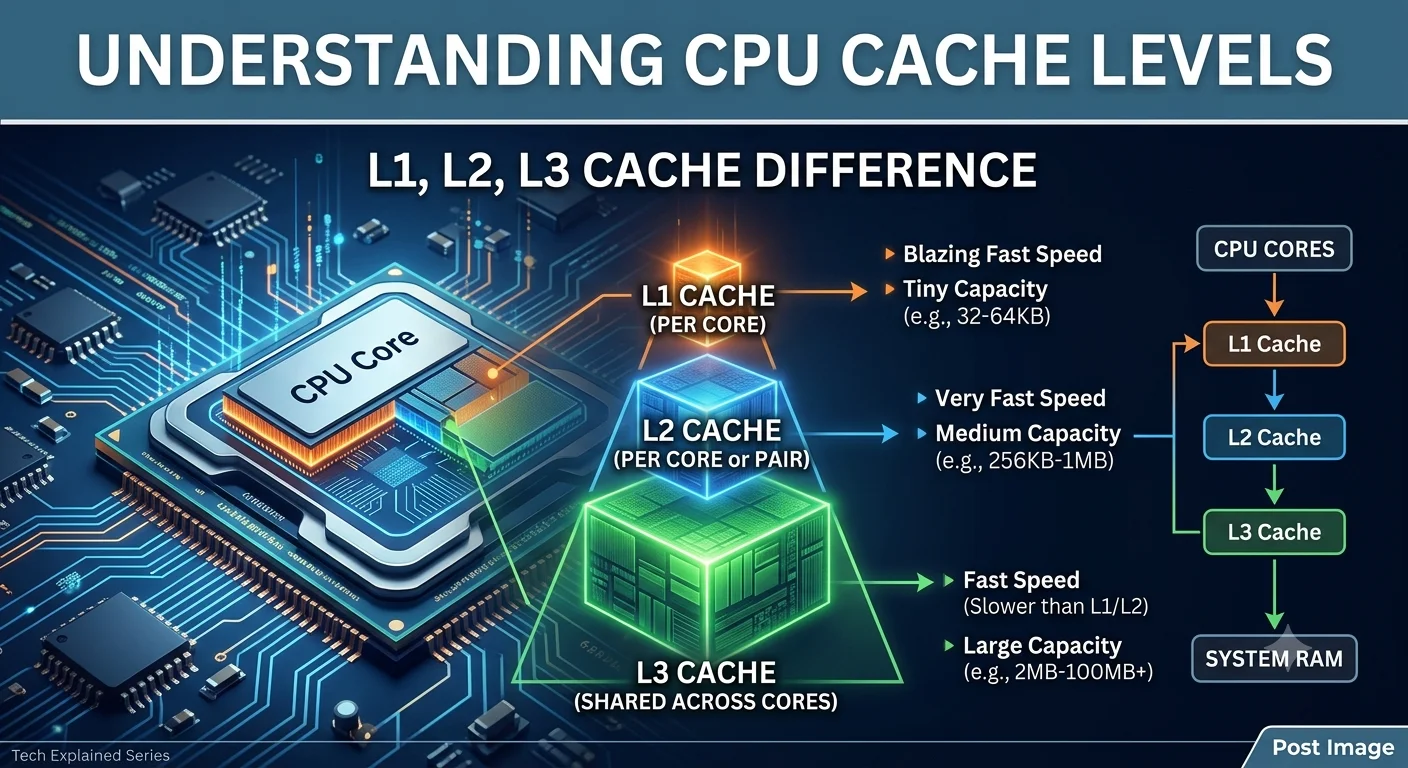
Inside every processor, there are different cache levels known as L1 Cache, L2 Cache, and L3 Cache. These cache levels work together to reduce the time a CPU spends waiting for data. Understanding their differences helps you better understand why some processors perform faster than others.
What is CPU Cache?
CPU cache is a small, ultra-fast memory built directly inside or very close to the processor. Its purpose is simple: store frequently used data so the CPU can access it immediately instead of retrieving it from slower system memory (RAM).
Without cache memory, the processor would repeatedly request data from RAM, which takes significantly more time and slows down overall performance. Think of cache as a shortcut between the processor and memory.
What is L1 Cache?
L1 (Level 1) Cache is the fastest cache memory inside the processor. It is located closest to the cpu core, allowing extremely fast access. Since speed is the priority, its storage capacity is very small. Each CPU core usually has its own dedicated L1 cache.
Main Characteristics of L1 Cache
- Fastest cache level
- Smallest storage capacity
- Located directly inside each CPU core
- Stores instructions currently needed by the processor
- Lowest latency among all cache levels
Most processors have 32KB to 128KB of L1 cache per core. Because of its speed, the CPU checks L1 cache first whenever it needs data.
What is L2 Cache?
L2 (Level 2) Cache is the second layer of cache memory. It is slightly slower than L1 cache but provides more storage space. When data is unavailable in L1 cache, the processor checks L2 cache next. In modern processors, L2 cache may be dedicated to individual cores or shared between certain cores.
Main Characteristics of L2 Cache
- Slower than L1 but still very fast
- Larger capacity than L1
- Acts as backup memory for L1 cache
- Reduces unnecessary RAM access
- Helps maintain processing efficiency during heavy workloads
Typical L2 cache size ranges from 256KB to 2MB per core.
What is L3 Cache?
L3 (Level 3) Cache is the largest cache memory in the processor. It is slower than both L1 and L2 cache, but still much faster than RAM. Unlike L1, L3 cache is commonly shared among multiple CPU cores. Its main job is to reduce communication delays when several cores need access to the same data.
Main Characteristics of L3 Cache
- Largest cache capacity
- Shared among processor cores
- Slower than L1 and L2
- Faster than RAM
- Improves multitasking and multi-core performance
Modern processors often include 8MB, 16MB, 32MB, or even more L3 cache.
L1 vs L2 vs L3 Cache – Comparison Table
| L1 Cache | L2 Cache | L3 Cache |
|---|---|---|
| Speed: Fastest | Speed: Very Fast | Speed: Fast |
| Size: Smallest | Size: Medium | Size: Largest |
| Inside each core | Near or inside core | Shared among cores |
| Access Priority: First | Access Priority: Second | Access Priority: Third |
| Latency: Lowest | Latency: Low | Latency: Higher |
| Purpose: Immediate data access | Purpose: Backup for L1 | Purpose: Shared data storage |
The CPU always checks cache levels in this order: L1 → L2 → L3 → RAM, The further the data is from the processor, the slower the access becomes.
How Cache Affects Performance
Cache memory directly influences how quickly a processor handles tasks.
- Faster Application Loading: Frequently used instructions stay in cache, reducing delays when launching software.
- Better Gaming Performance: Games constantly process textures, physics calculations, and AI behavior. More cache can reduce data retrieval delays.
- Improved Multitasking: When multiple applications run together, larger cache helps the processor manage repeated data requests efficiently.
- Better Productivity Performance: Video editing, programming, rendering, and large spreadsheets benefit from faster data access.
Does More Cache Always Mean Better Performance?
Not always.
A processor with more cache usually performs better in cache-sensitive workloads, but overall performance also depends on:
- CPU architecture
- Clock speed
- Core count
- Thread count
- Thermal efficiency
- Software optimization
For example, a modern processor with less cache can outperform an older processor with larger cache because architecture matters too.
Final Thoughts
L1, L2, and L3 cache are essential parts of every modern processor. They exist to reduce the time a CPU spends waiting for data and to keep processing as fast as possible.
The biggest difference is simple:
- L1 Cache = Smallest but fastest
- L2 Cache = Balanced speed and size
- L3 Cache = Largest but slower than L1 and L2
When comparing processors, checking cache size gives useful insight into performance, especially for gaming, multitasking, and professional workloads.
Understanding cache memory helps you make smarter decisions when choosing a CPU instead of focusing only on clock speed or core count only.



- Be Respectful
- Stay Relevant
- Stay Positive
- True Feedback
- Encourage Discussion
- Avoid Spamming
- No Fake News
- Don't Copy-Paste
- No Personal Attacks
- Be Respectful
- Stay Relevant
- Stay Positive
- True Feedback
- Encourage Discussion
- Avoid Spamming
- No Fake News
- Don't Copy-Paste
- No Personal Attacks
