What Is Mouse Cable? | Parts – Types | Pros & Cons
Published: 25 Apr 2026
A mouse cable is a wire that connects a mouse to a computer or laptop. It sends movement and click signals from the mouse to the computer so the cursor can move on the screen.
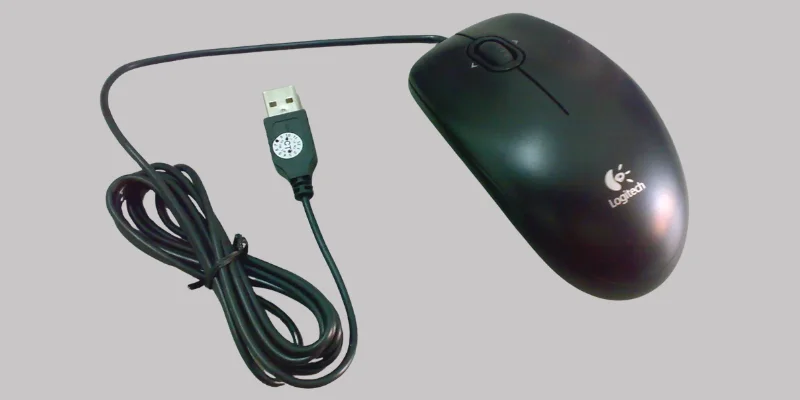
The cable also provides power to the mouse, so it works without batteries. In simple words, the mouse cable acts like a communication bridge between the mouse and the computer.
Location of Mouse Cable
The mouse cable is attached to the front side of a wired mouse. One end of the cable is fixed inside the mouse body, while the other end has a USB connector that plugs into the computer or laptop.
You can usually find the cable connected to a USB port on the cpu case or the side of a laptop. This connection allows the mouse to communicate directly with the computer.
Parts of a Mouse Cable
A mouse cable may look simple from outside, but it has several important parts inside it:
- Inner Wires: These thin wires carry electrical signals and data between the mouse and the computer.
- Insulation Layer: Each wire is covered with insulation to protect it from damage and prevent short circuits.
- Outer Protective Cover: The outer rubber or plastic covering protects the cable from bending, dust, and daily wear.
- USB Connector: This is the metal plug at the end of the cable that connects the mouse to the computer’s USB port.
Types of Mouse Connections
Mice can connect to a computer in different ways. The two main types of mouse cable connections are:
1. USB Mouse Connection
This is the most common type used today. The mouse cable ends with a USB connector that plugs into the computer or laptop’s USB port. It is easy to use and works with almost all modern computers.
2. PS/2 Mouse Connection
This is an older type of mouse connection. It uses a round connector that plugs into a special PS/2 port on older computers. Today, it is rarely used because USB mice are faster and more convenient.
Advantages and Disadvantages of Mouse Cable
In this topic, we will learn about the advantages and disadvantages of a mouse cable. We will understand why a wired mouse is useful and also what problems it can have in daily use.
| Advantages of Wired Mouse |
|---|
|
| Disadvantages of Wired Mouse |
|---|
|
Mouse Cable Care Tips
- Do Not Pull the Cable: Always unplug the mouse by holding the USB connector, not by pulling the wire.
- Avoid Strong Bends: Do not bend the cable too tightly, as it can break the inner wires.
- Keep It Untangled: Try to keep the cable straight so it does not get twisted or knotted.
- Protect from Sharp Edges: Make sure the cable does not rub against sharp corners of the table.
- Clean Gently: Wipe the cable with a soft cloth to remove dust, but avoid using water.
Conclusion
A mouse cable is an important part of a wired mouse that helps in smooth communication between the mouse and the computer. We have learned its parts, types and advantages and disadvantages also in a simple way.
If you still have any confusion or questions, feel free to ask in the comments. I’ll answer.


- Be Respectful
- Stay Relevant
- Stay Positive
- True Feedback
- Encourage Discussion
- Avoid Spamming
- No Fake News
- Don't Copy-Paste
- No Personal Attacks
- Be Respectful
- Stay Relevant
- Stay Positive
- True Feedback
- Encourage Discussion
- Avoid Spamming
- No Fake News
- Don't Copy-Paste
- No Personal Attacks
