What is Trackball Mouse | Parts – History | Features & Limitations
Published: 15 Sep 2026
A trackball mouse is a special type of computer mouse that has a large ball fixed on its top or side. Instead of moving the whole mouse on the desk, you simply rotate the ball with your fingers or thumb to move the cursor on the screen.
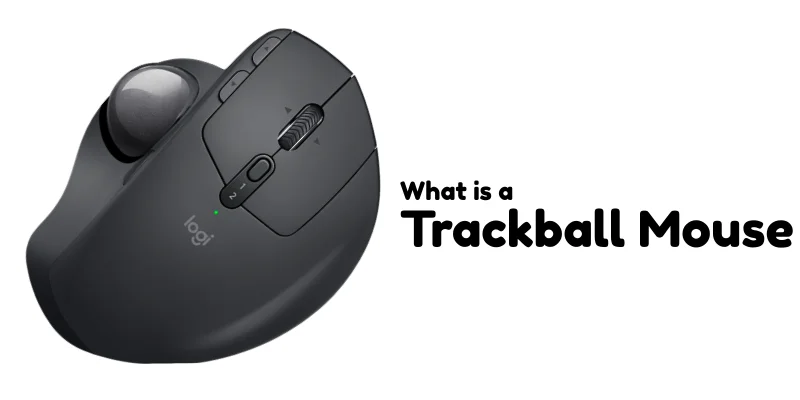
Unlike a regular mouse that slides across the surface, a trackball mouse stays in one place. Inside the device, sensors detect the movement of the ball and send signals to the computer, which then moves the pointer accordingly.
Main Parts of a Trackball Mouse
A trackball mouse may look a little different from a regular mouse, but its main parts are quite simple and easy to understand. Let’s look at the important parts one by one.
1. Track Ball
The trackball is the most important part of this mouse. It is a large ball placed on the top or side of the device. You rotate this ball with your fingers or thumb to move the cursor on the screen. The mouse itself does not move, only the ball moves.
2. Buttons
Like a regular mouse, a trackball mouse also has left and right buttons. These buttons are used to click, select, open files, and perform other common tasks on the computer.
3. Scroll Wheel
Many trackball mice include a scroll wheel between the buttons. It allows you to scroll up and down on web pages, documents, and other content easily.
4. Body / Base
The body of the trackball mouse holds all the internal parts together. Unlike a traditional mouse, it stays fixed in one place on the desk and does not need to be moved around.
5. Internal Sensors
Inside the mouse, there are small sensors that detect the movement of the ball. When you rotate the trackball, these sensors send signals to the computer, which moves the cursor on the screen.
Where is Trackball Mouse Used?
- Small Workspaces: In offices or desks where there is very little space, a trackball mouse is helpful because it stays in one place and does not need extra room to move.
- Graphic Designing and Editing: Some designers and video editors prefer a trackball mouse for detailed and precise cursor control. It allows fine movements without moving the hand too much.
- People with Wrist Problems: Some users choose a trackball mouse because it requires less arm movement. This can reduce wrist strain for certain people.
| Limitations of Trackball Mouse |
|---|
|
History of the Trackball Mouse
The trackball mouse has an interesting history. It was first developed in 1952 by Ralph Benjamin as part of a military radar system in the UK. Around the same time, Canadian engineers Tom Cranston, Fred Longstaff, and Kenyon Taylor created a similar trackball device for the DATAR naval system.
Originally used for military purposes, the concept later evolved into a computer input device for offices, designers, and everyday users.
Over time, the trackball mouse became a unique alternative to the traditional mouse, especially in situations requiring precision and limited desk space.
Trackball Mouse vs Regular Mouse
| Feature | Trackball Mouse | Regular Mouse |
|---|---|---|
| Movement Style | Cursor moves by rotating a fixed ball with fingers. | Cursor moves by sliding the whole mouse on the desk. |
| Space Requirement | Needs very little desk space. | Requires more desk space to move around. |
| Learning Curve | May take time to get used to. | Easy to use and familiar to most people. |
| Comfort | Reduces arm movement; good for small areas. | Requires more wrist and arm movement. |
| Maintenance | Ball may need cleaning occasionally. | Sensor area may need cleaning. |
Final Words
In this article, we learned what a trackball mouse is and how it is different from a regular mouse. We discussed its main parts, how it works, where it is used, and its limitations.
Now you clearly understand that a trackball mouse allows you to control the cursor by rotating a ball instead of moving the entire device.
Technology may look confusing at first, but once you understand how it works, it becomes simple and interesting. If you ever see a trackball mouse, you won’t feel confused anymore, you’ll know exactly how it works.
Frequently Asked Questions (FAQ’s)
In this section we will take a look on some common questions to solve your confusions:
Most modern trackball mice are compatible with major operating systems like Microsoft Windows, macOS, and Linux.
They usually work as plug-and-play devices, meaning you can connect them through USB or Bluetooth and start using them without installing special software.
However, some advanced features (like programmable buttons) may require additional drivers or software, and those features may not work equally on all systems.
Trackball mice are generally more expensive than standard optical mice.
Basic regular mice are usually very affordable, while trackball models can cost more due to their specialized design and smaller market demand. High-end ergonomic trackballs can be significantly pricier compared to simple wired mice.
Certain models may meet workplace safety guidelines or ergonomic design recommendations. While there is no single universal “trackball certification,” some products are tested according to ergonomic research standards and health guidelines.
It depends on the user.
For people who work long hours on a computer, especially in design or editing, a trackball mouse may reduce arm movement and desk space usage. Over time, this can increase comfort, which may improve productivity.
However, productivity benefits usually appear after the user becomes fully comfortable with the device.
Trackball mice are considered a niche product today.
Regular optical and wireless mice dominate the general market. However, trackball devices remain popular among specific users such as designers, engineers, and people looking for ergonomic alternatives.
So overall, they are not mainstream, but they still have a dedicated user base.



- Be Respectful
- Stay Relevant
- Stay Positive
- True Feedback
- Encourage Discussion
- Avoid Spamming
- No Fake News
- Don't Copy-Paste
- No Personal Attacks
- Be Respectful
- Stay Relevant
- Stay Positive
- True Feedback
- Encourage Discussion
- Avoid Spamming
- No Fake News
- Don't Copy-Paste
- No Personal Attacks
