What is Optical Mouse | Parts | Uses & Comparison
Published: 15 Sep 2026
An optical mouse is a type of computer mouse that uses a small LED, to detect movement on a surface. Instead of using a rolling ball like older mice, it tracks motion by capturing tiny images of the surface and sending that information to the computer.
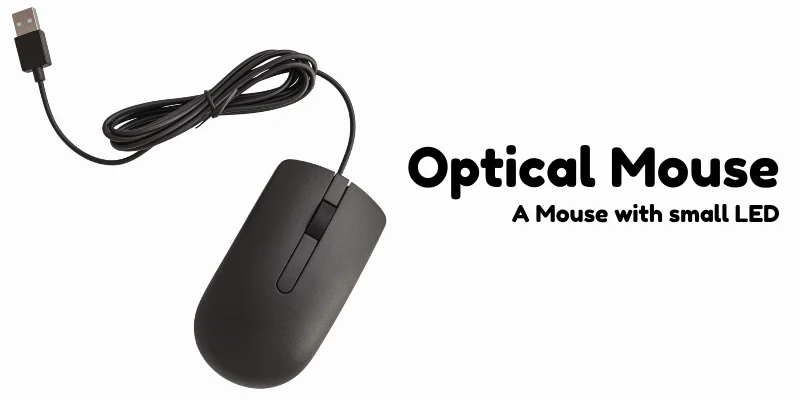
This allows the cursor on the screen to move accurately when the mouse is moved. Optical mice are widely used today, and become a common input device for everyday computer tasks such as browsing, typing, and office work.
Main Parts of an Optical Mouse
Let’s take a look on some main parts of an optical mouse for your better understanding:
1. LED Light
The LED light is located at the bottom of the optical mouse. It shines light onto the surface under the mouse, helping the device detect movement. This light allows the mouse to track how it moves across the desk or mouse pad.
2. Optical Sensor
The optical sensor captures tiny images of the surface beneath the mouse. It continuously analyzes these images to detect even small movements.
3. Digital Signal Processor (DSP)
The Digital Signal Processor processes the images captured by the sensor. It compares thousands of images every second to determine the direction and speed of movement. Then it sends this information to the computer so the cursor moves correctly.
4. Left and Right Buttons
These are the main buttons used for clicking and selecting items on the computer. The left button is usually used for selecting, dragging, and opening files, while the right button is used to open menus and additional options.
5. Scroll Wheel
The scroll wheel is placed between the left and right buttons. It allows users to scroll up and down through documents, web pages, and other content quickly and easily.
6. USB Cable or Wireless Receiver
This part connects the mouse to the computer. A wired optical mouse uses a USB cable, while a wireless optical mouse uses a small receiver or Bluetooth connection to communicate with the computer.
Uses of an Optical Mouse
- Navigating the computer – moving the cursor to open files, folders, and programs.
- Browsing the internet – clicking links and scrolling through web pages easily.
- Office work – selecting text, editing documents, and managing files.
- Graphic design tasks – basic drawing, editing images, and selecting tools in design software.
Optical Mouse vs Older One
| Feature | Optical Mouse | mechanical mouse |
|---|---|---|
| Technology | Uses LED light and sensor to detect movement | Uses a rolling rubber ball to detect movement |
| Accuracy | More accurate and smooth | Less accurate compared to optical |
| Maintenance | Requires very little maintenance | Needs frequent cleaning of the ball |
| Moving Parts | No moving tracking parts | Contains a moving ball and rollers |
| Performance | Faster and smoother cursor movement | Can become slow or jumpy if dirty |
| Popularity | Widely used today | Mostly outdated and rarely used |
Advantages and Disadvantages
In this section we will take a look on some pros and cons of regular mouse, let’s see:
| Advantages of an Optical Mouse |
|---|
|
| Disadvantages of an Optical Mouse |
|---|
|
Final Words
In this article, we learned what an optical mouse is and how it works in a computer system. We also discussed the main parts of an optical mouse and its common uses in everyday computer tasks. Finally, we looked at the advantages and disadvantages of using an optical mouse.
Understanding these basics helps beginners know why the optical mouse is one of the most commonly used input devices today.


- Be Respectful
- Stay Relevant
- Stay Positive
- True Feedback
- Encourage Discussion
- Avoid Spamming
- No Fake News
- Don't Copy-Paste
- No Personal Attacks
- Be Respectful
- Stay Relevant
- Stay Positive
- True Feedback
- Encourage Discussion
- Avoid Spamming
- No Fake News
- Don't Copy-Paste
- No Personal Attacks
