Four Basic Functions of a Computer | Input – Output | Processing & Storage
Published: 15 Sep 2026
Ever think what are the four main tasks that all computers perform? Computer works using simple steps. These steps are called the basic functions of a computer.
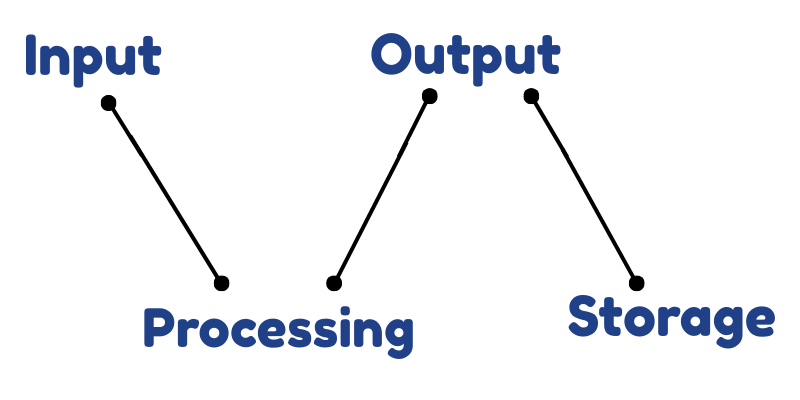
In this article, we will learn about Input, Processing, Output, and Storage in very simple way. By the end, you will understand how a computer manage things.
➤ Input
Input means giving information to the computer. Just like we tell something to a friend, we give data to a computer using input devices. When we type on a keyboard, click with a mouse, or speak into a microphone, we are giving input.
This tells the computer what we want it to do. Without input, the computer cannot start working. Input is the first and most important step because the computer works only after receiving instructions.
➤ Processing
Processing means the computer works on the information we give it. It thinks and changes input into useful results.
When you type numbers in a calculator and press plus (+), the computer adds them. This adding work is called processing. The computer’s brain is called the cpu. It does all the thinking and fast calculations. Processing is the main function, because it makes the computer useful for us.
➤ Output
Output means the result we get from the computer after it process on our input. It is what we see, hear, or get from the computer.
When a picture appears on the screen, it is output. When a printer prints a document on paper, it is also output. Common output devices are monitor, printer, and speaker. They help us see or hear the computer’s work.
➤ Storage
Storage means keeping information safe in the computer for later use. It helps the computer remember our work. It stays in the computer even after turning it off. When we save Documents, pictures, or videos, they go into storage. We can open them again anytime we want.
Common storage devices are hard disk, USB, and memory card. They hold a lot of data inside the computer.
Final Words
In this article, we learned the 4 basic functions of a computer in simple words. We understood how a computer takes input, works on it through processing, shows results as output, and saves information using storage.
My personal advice is to practice by noticing these steps when you use a computer or mobile. It will make learning fun and clear.
If you have any confusion or questions, feel free to ask in the comments. I’ll be happy to help you understand better.
FAQs – Let’s Clear Some Questions
In this section, we answer some interesting questions about computers. These answers will help you understand computers even better!
First computer idea was given by Charles Babbage. He wanted to make a machine that could solve math problems quickly and correctly. That is why he is called the “Father of the Computer.”
Computer works very fast but only follows instructions. The human brain can think, feel, and make decisions on its own. The computer cannot think without commands.
Computer follows programs that are written by humans. These programs tell the computer what to do step by step. Without programs, a computer cannot work.
Computers can do millions of calculations in one second. They never get tired or make mistakes like humans do. That is why they are much faster in math work.
If the instruction is wrong, the computer gives a wrong result. It does not know right or wrong, it only follows commands. That’s why correct instructions are very important.

- Be Respectful
- Stay Relevant
- Stay Positive
- True Feedback
- Encourage Discussion
- Avoid Spamming
- No Fake News
- Don't Copy-Paste
- No Personal Attacks
- Be Respectful
- Stay Relevant
- Stay Positive
- True Feedback
- Encourage Discussion
- Avoid Spamming
- No Fake News
- Don't Copy-Paste
- No Personal Attacks
