Characteristics of Computer | Speed – Versatility | Accuracy & Automation
Published: 15 Sep 2026
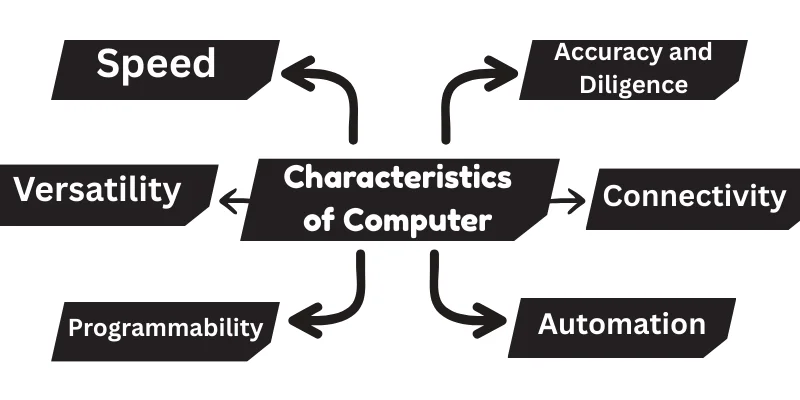
Ever think about why computers seem creepy in what they can do? From solving complex problems to handling our daily tasks, they work faster and smarter than we often realize. But what exactly makes them so powerful and dependable? Let me explain:
1. Speed
One of the most impressive features of a computer is its speed. I remembered an Adage here, I hear from my respectable Teacher: “Nowadays speed is key.”
Tasks that take humans hours, like solving math problems or analyzing large amounts of data, are completed by computers within seconds. Due to this, computers have gained popularity in every field, from education and business to science and technology.
2. Accuracy and Diligence
Computers have another property called accuracy, which means they give correct results almost every time. Unlike humans! Really, it’s a bitter truth, but they don’t get tired, distracted, or confused while working.
This ability is known as diligence. Calculations and operations are exact even after hours of working without rest.
- Computers don’t guess; they only follow the data and commands given. Correct input leads to correct output.
- Software controls the logic, so errors in code can cause wrong results even if hardware is perfect.
3. Versatility
Another reason for the popularity of computer is, To do many different things at the same time. It can switch quickly from one job to another without slowing down or getting confused. Buddies, this quality is called versatility,
- A computer can handle many tasks like studying, designing, gaming, writing, and even controlling machines.
- It switches quickly between apps, allowing multitasking with ease.
- Its versatility comes from software; new programs turn it into a new tool each time. It adapts to new technology and updates, staying useful for years.
4. Connectivity
One more amazing ability is connecting and sharing information with other devices, networks, or systems. Without connectivity, most modern computer functions would not be possible.
- Computers connect to the internet through Wi-Fi, broadband, or mobile data for browsing, cloud use, and real-time communication.
- Email, video calls, and online collaboration all rely on stable connectivity.
- Connected computers can share data across different operating systems like Windows, macOS, and Linux.
- Connectivity powers global systems in banking, education, and more, keeping the world linked together.
5. Programmability
We can tell them exactly what to do through programs. This ability to follow different sets of instructions is called programmability. It allows one computer to perform thousands of tasks – from writing documents to controlling robots – just by changing the software.
- Software gives purpose: Without software, a computer is just hardware with no action. Programs guide it to perform tasks like calculations, design, or communication.
- Easy updates: Programmability lets users improve or fix systems by updating software instead of replacing the entire device.
- Customization power: Businesses and individuals can build custom apps to suit their needs, such as inventory tools, learning platforms, or medical systems.
6. Automation
Automation in computers! Does it mean doing tasks automatically? without needing someone to control every step? Yes! This is the truth. Once the instructions are set, the computer follows them on its own. This makes work faster, easier, and free from human error. What its mean:
- Smart Decision-Making: Modern computers use built-in logic and data patterns to make choices, like adjusting brightness or saving power, scanning for viruses, or sending backup files, etc.
- Real-World Examples:
- Auto-updates: Computers and phones update apps or software to keep them secure.
- Scheduled tasks: Systems automatically back up data or clear unwanted files at a set time.
7. Memories
Does the memory of a computer work like our brain? It’s True! It stores information, remembers what’s needed, and helps the system work smoothly.
Every computer uses memory to save data, open files, and run programs. It’s Bitter, but without memory, a computer cannot perform even the simplest task.
How it Manages Data
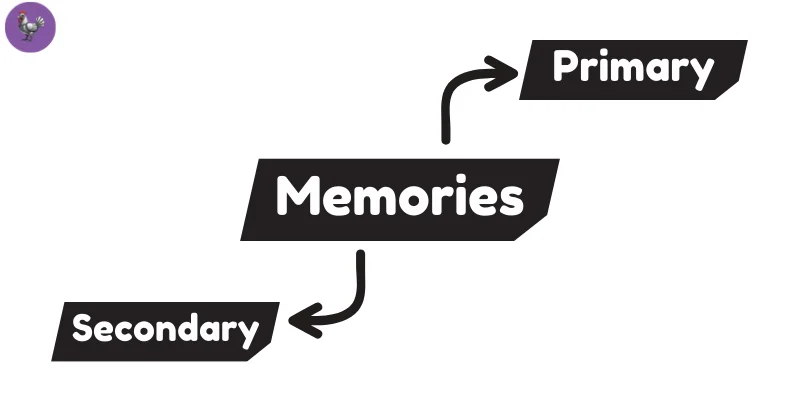
Two main types of memory:
- Primary Memory – Fast but temporary storage used while the computer is running (RAM).
- Secondary Memory – Long-term storage used to keep data even when the computer is off (hard drives, SSDs, or cloud storage).
Working process
The computer first loads data from storage into RAM. When you open an app, it runs from this memory because it’s faster. Once you save your work, it’s stored permanently on a hard drive or SSD.
Data management
Computers use organized structures, like folders and databases, to store information in a neat and accessible way. This helps the system find and update data quickly.
Evolution of Computer Characteristics
Computers started as giant machines that filled whole rooms and still struggled with simple tasks. With each generation, they became quicker, smarter, and smaller, almost like they were leveling up.
As chips shrank and speed shot up, these machines turned into powerful tools we can hold in our hands. Nowadays, computers feel almost alive with speed and accuracy, totally changing how we work, learn, and live life every day.
Final Words
So, guys, it’s important to understand these traits so we can use technology more effectively. Keep learning, folks – because the world of computers keeps getting smarter every day!
The main characteristics of a computer include speed, accuracy, diligence, versatility, and storage. A computer can perform tasks very fast without getting tired. It gives accurate results when the input is correct. These features make computers reliable and useful in daily life.
Speed allows a computer to complete tasks in seconds that may take humans hours. It helps in calculations, data processing, and multitasking. Fast speed saves time and increases productivity. That’s why computers are used everywhere today.
Memory helps a computer store data and run programs smoothly. RAM allows fast access while the computer is working. Storage devices keep data safe for long-term use. Without memory, a computer cannot perform even basic tasks.
Versatility means a computer can perform many different tasks. It can be used for studying, gaming, designing, and communication. By changing software, the same computer can do new work. This makes it useful for students, offices, and businesses.
No, a computer does not have emotions or feelings. It cannot think or feel like humans. A computer only follows instructions given by users or programs. It works based on logic, not emotions
A computer cannot work on its own without instructions. It needs programs or commands to perform tasks. Without software, a computer is just an empty machine. Instructions guide every action it takes.
Computers are not naturally intelligent like humans. They only appear smart because of programmed instructions.Even advanced systems work on data and rules. They cannot think independently.
Computers need electricity to power their hardware components. Without power, the system cannot run programs or store data. Electricity allows the processor, memory, and storage to function. No power means no operation.
Computers can make limited decisions based on programmed rules. They follow predefined logic set by developers.
These decisions are automatic but not independent thinking. Humans still control how decisions are made.


- Be Respectful
- Stay Relevant
- Stay Positive
- True Feedback
- Encourage Discussion
- Avoid Spamming
- No Fake News
- Don't Copy-Paste
- No Personal Attacks
- Be Respectful
- Stay Relevant
- Stay Positive
- True Feedback
- Encourage Discussion
- Avoid Spamming
- No Fake News
- Don't Copy-Paste
- No Personal Attacks
